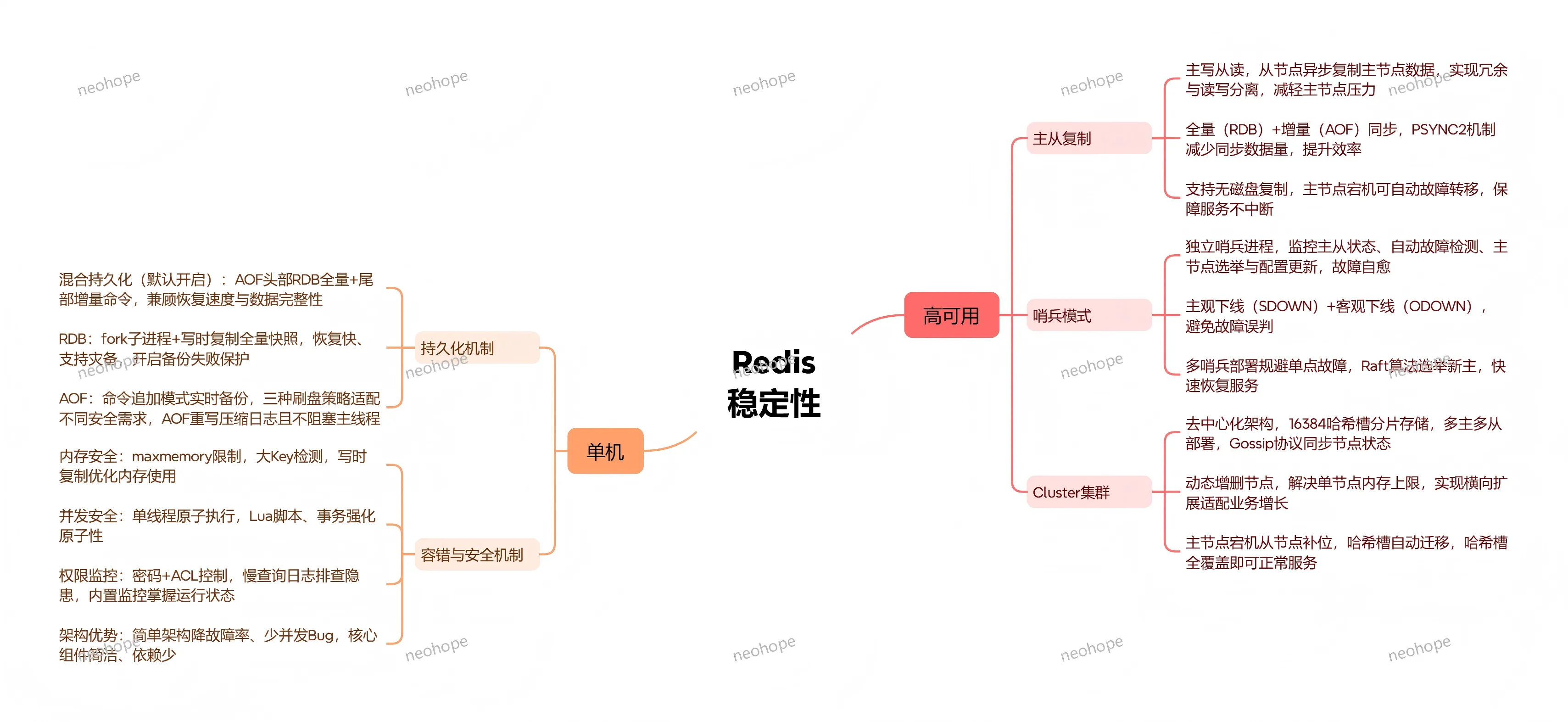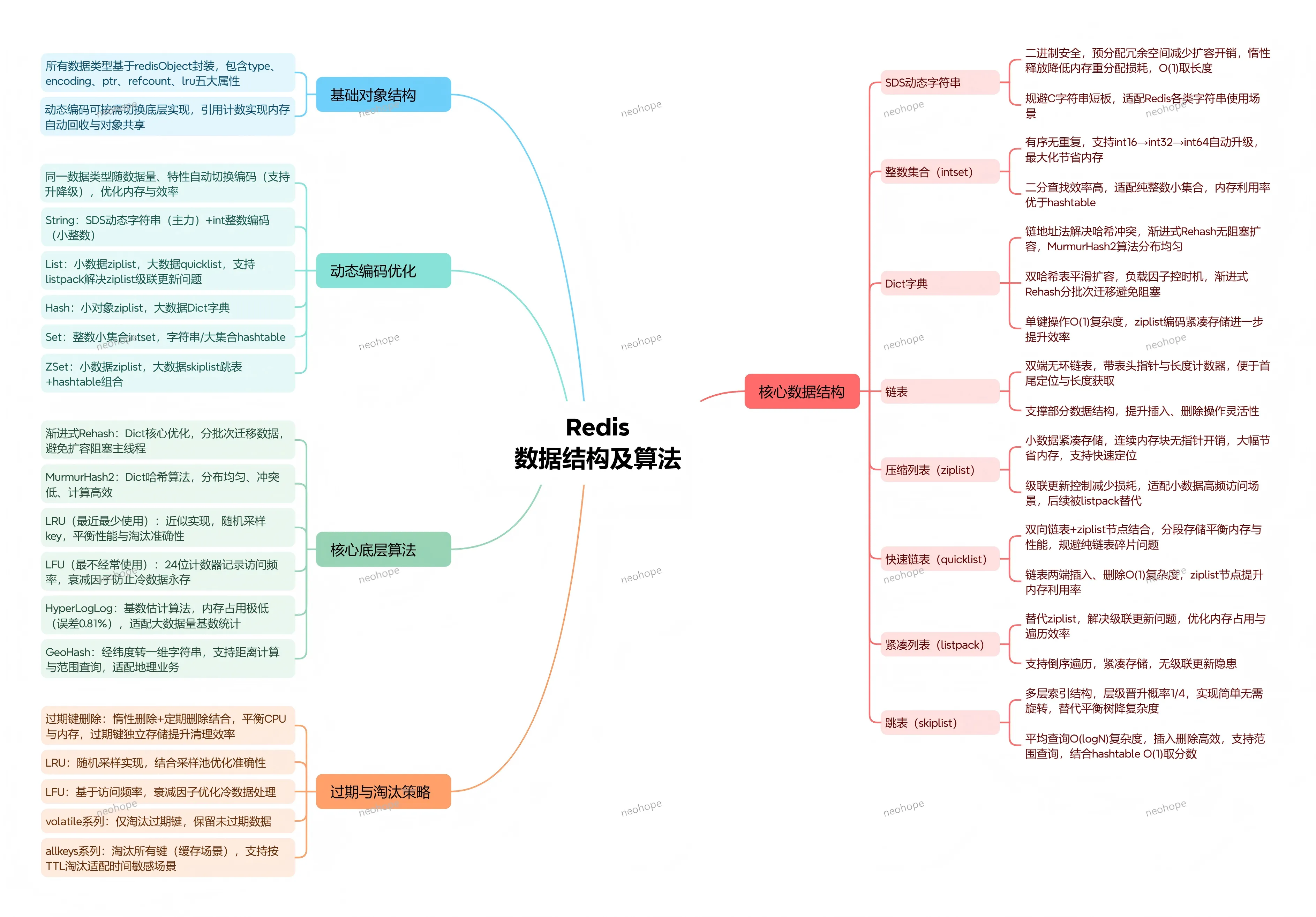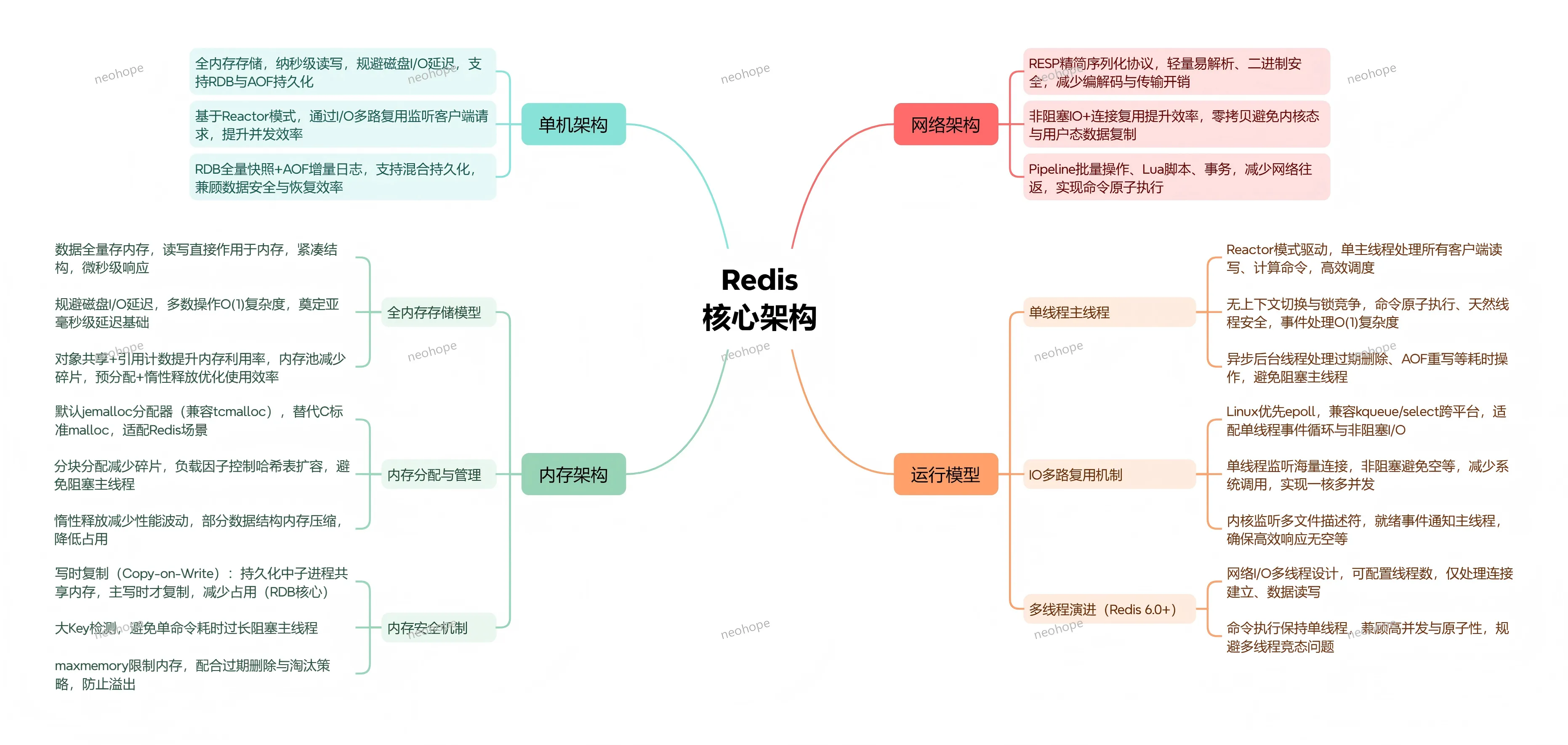
在如今的分布式系统、高并发场景中,Redis绝对是绕不开的存在——它既是高性能的缓存中间件,也是灵活的键值数据库,甚至能承担消息队列、分布式锁等多种角色。很多开发者日常都会用Redis,但大多停留在“set/get”的基础用法,对它为什么快、支持哪些核心场景、背后靠什么架构和算法实现这些特性,却了解不深。今天就来一篇干货,从核心定位切入,逐步拆解Redis的功能、特性、架构、算法,结合版本演进和典型应用,帮大家真正读懂Redis的核心技术体系。
Learn and share.
在如今的分布式系统、高并发场景中,Redis绝对是绕不开的存在——它既是高性能的缓存中间件,也是灵活的键值数据库,甚至能承担消息队列、分布式锁等多种角色。很多开发者日常都会用Redis,但大多停留在“set/get”的基础用法,对它为什么快、支持哪些核心场景、背后靠什么架构和算法实现这些特性,却了解不深。今天就来一篇干货,从核心定位切入,逐步拆解Redis的功能、特性、架构、算法,结合版本演进和典型应用,帮大家真正读懂Redis的核心技术体系。
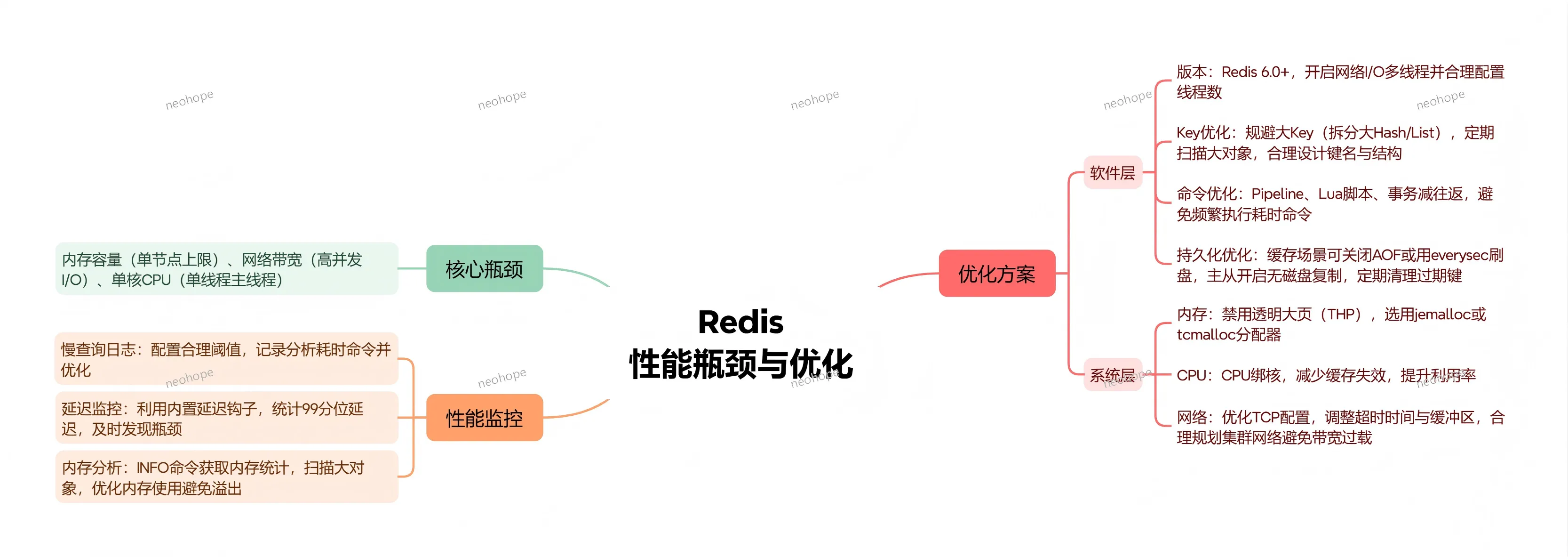
一、核心瓶颈
主要限制:内存容量(单节点内存上限)、网络带宽(高并发下网络I/O瓶颈)、单核CPU性能(单线程主线程瓶颈)。
最近阅读了Redis6.2源码,添加了一些注释,感兴趣的同学可以看下。
https://github.com/neohope/NeoRedisSrc
下面的Java代码,演示了三种常用的Memcached常用驱动的连接方式,所有驱动现在都托管在GitHub上面,大家可以自行查找。
*生产环境建议直接用linux
1、命令行直接运行
1.1、可以直接指定参数运行
#最大16M内存,监听11211端口,最大连接数8
memcached.exe -m 16 -p 11211 -c 8
1.2、可以注册为Windows服务,再运行
#注册为服务
memcached.exe -d install
#开启服务
memcached.exe -d start
#关闭服务
memcached.exe -d stop
#卸载服务
memcached.exe -d uninstall
Redis的分片技术一般是通过客户端或代理来实现的
1、用jedis实现分片的时候,服务端不需要做任何配置即可
package com.djhu.redis.test;

import java.util.ArrayList;
import java.util.List;

import redis.clients.jedis.JedisShardInfo;
import redis.clients.jedis.ShardedJedis;

public class JedisShardTest
{
	public static void main(String[] args)
	{
		List<JedisShardInfo> jedisShardInfoList = new ArrayList<JedisShardInfo>();
		jedisShardInfoList.add(new JedisShardInfo("172.16.172.4", 6379));
		jedisShardInfoList.add(new JedisShardInfo("172.16.172.4", 6380));

		ShardedJedis sharded = new ShardedJedis(jedisShardInfoList);
		sharded.set("key01", "a");
		sharded.set("key02", "b");
		sharded.set("key03", "c");
		sharded.set("key04", "d");
		sharded.set("key05", "e");

		System.out.println(sharded.get("key03"));
	}
}
2、用Jedis连接池实现分片
package com.djhu.redis.test;

import java.util.ArrayList;
import java.util.List;

import redis.clients.jedis.Jedis;
import redis.clients.jedis.JedisShardInfo;
import redis.clients.jedis.ShardedJedis;
import redis.clients.jedis.ShardedJedisPool;
import redis.clients.jedis.JedisPoolConfig;
import redis.clients.util.Hashing;
import redis.clients.util.Sharded;

public class JedisSharedFactory
{
	// 最大可用连接数,默认值为8,如果赋值为-1则表示不限制
	private static int MAX_TOTAL = 256;
	// 最大空闲连接数,默认值为8
	private static int MAX_IDLE = 32;
	// 最小空闲连接数
	private static int MIN_IDLE = 4;
	// 最大等待连接毫秒数,默认值为-1表示永不超时
	private static int MAX_WAIT = 3000;
	// 连接redis超时时间
	private static int TIMEOUT = 3000;
	// true表示验证连接
	private static boolean TEST_ON_BORROW = true;

	//连接池
	private static ShardedJedisPool jedisPool = null;
	public static void initJedisPool()
	{
		try
		{
			JedisPoolConfig config = new JedisPoolConfig();
			config.setMaxTotal(MAX_TOTAL);
			config.setMaxIdle(MAX_IDLE);
			config.setMinIdle(MIN_IDLE);
			config.setMaxWaitMillis(MAX_WAIT);
			config.setTestOnBorrow(TEST_ON_BORROW);

			List<JedisShardInfo> jedisShardInfoList = new ArrayList<JedisShardInfo>();
			jedisShardInfoList.add(new JedisShardInfo("172.16.172.4", 6379));
			jedisShardInfoList.add(new JedisShardInfo("172.16.172.4", 6380));
			jedisPool = new ShardedJedisPool(config, jedisShardInfoList,Hashing.MURMUR_HASH,Sharded.DEFAULT_KEY_TAG_PATTERN);
		}
		catch (Exception e)
		{
			e.printStackTrace();
		}
	}

	public synchronized static ShardedJedis getConnection()
	{
		try
		{
			if (jedisPool != null)
			{
				ShardedJedis resource = jedisPool.getResource();
				return resource;
			} else
			{
				return null;
			}
		}
		catch (Exception e)
		{
			e.printStackTrace();
			return null;
		}
	}

	public static void returnResource(final ShardedJedis jedis)
	{
		if (jedis != null)
		{
			jedis.close();
		}
	}

	public static void main(String[] args)
	{
		initJedisPool();
		ShardedJedis redis = getConnection();
		redis.set("key10", "j");
		redis.set("key11", "k");
		redis.set("key12", "l");
		redis.set("key13", "m");
		redis.set("key14", "n");

		System.out.print(redis.get("key12"));

		returnResource(redis);
	}
}
1、源码如下
package com.djhu.redis.test;

import java.util.Set;
import java.util.HashSet;

import redis.clients.jedis.HostAndPort;
import redis.clients.jedis.JedisCluster;

public class JedisClusterTest
{
	public static void main(String[] args)
	{
		Set<HostAndPort> jedisClusterNodes = new HashSet<HostAndPort>();
        jedisClusterNodes.add(new HostAndPort("172.16.172.4", 6379));
        jedisClusterNodes.add(new HostAndPort("172.16.172.4", 6380));
        jedisClusterNodes.add(new HostAndPort("172.16.172.4", 6381));
        jedisClusterNodes.add(new HostAndPort("172.16.172.4", 6382));
        jedisClusterNodes.add(new HostAndPort("172.16.172.4", 6383));
        jedisClusterNodes.add(new HostAndPort("172.16.172.4", 7384));

		//JedisCluster cluster = new JedisCluster(jedisClusterNodes,3000,1000);
        JedisCluster cluster = new JedisCluster(jedisClusterNodes);
		cluster.set("key10", "j");
		cluster.set("key11", "k");
		cluster.set("key12", "l");
		cluster.set("key13", "m");
		cluster.set("key14", "n");

		System.out.println(cluster.get("key12"));

	}
}
2、如果遇到下面错误,主要是因为建立cluster时,ip用了127.0.0.1。用其他ip重建一下cluster,就可以解决了。
Exception in thread "main" redis.clients.jedis.exceptions.JedisClusterMaxRedirectionsException: Too many Cluster redirections?
	at redis.clients.jedis.JedisClusterCommand.runWithRetries(JedisClusterCommand.java:34)
	at redis.clients.jedis.JedisClusterCommand.runWithRetries(JedisClusterCommand.java:68)
	at redis.clients.jedis.JedisClusterCommand.runWithRetries(JedisClusterCommand.java:85)
	at redis.clients.jedis.JedisClusterCommand.runWithRetries(JedisClusterCommand.java:68)
	at redis.clients.jedis.JedisClusterCommand.runWithRetries(JedisClusterCommand.java:85)
	at redis.clients.jedis.JedisClusterCommand.runWithRetries(JedisClusterCommand.java:68)
	at redis.clients.jedis.JedisClusterCommand.run(JedisClusterCommand.java:29)
	at redis.clients.jedis.JedisCluster.set(JedisCluster.java:75)