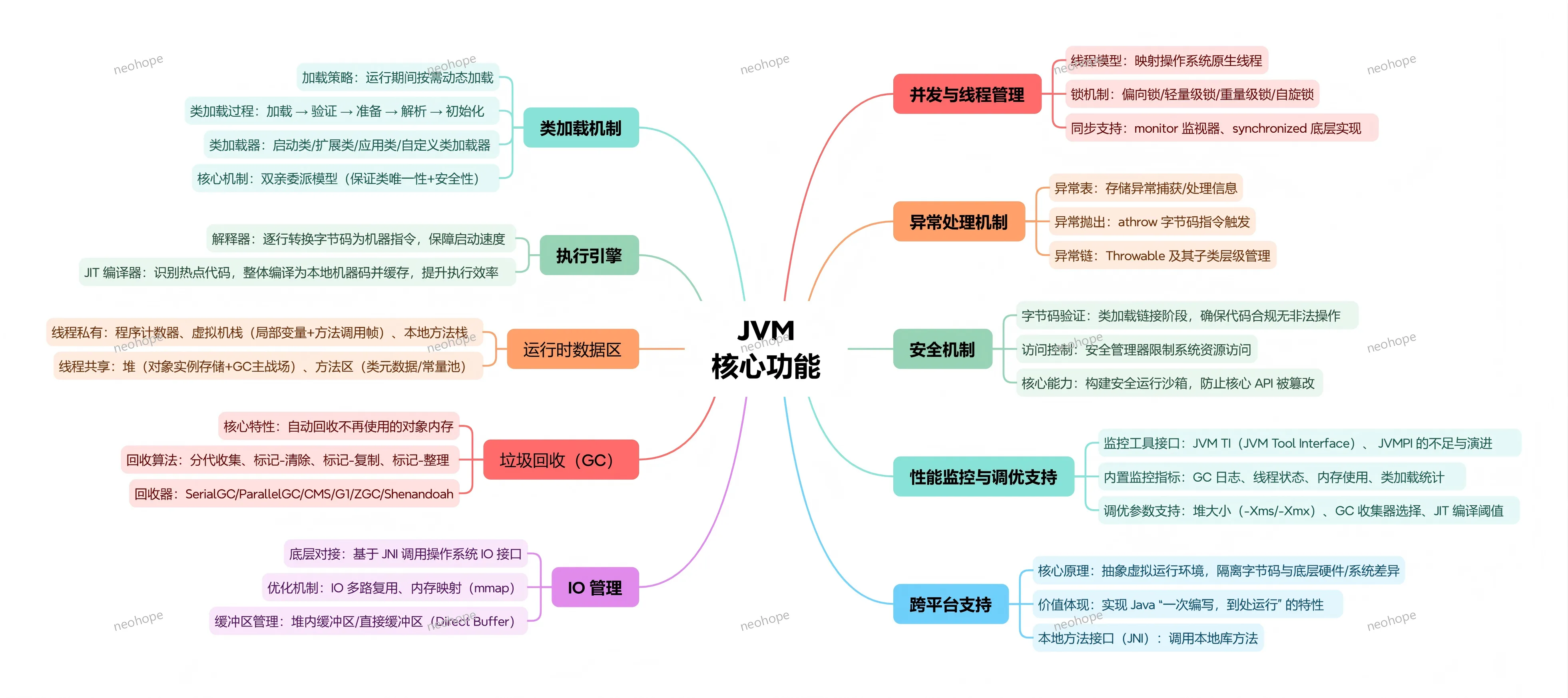
JVM核心功能:
Category Archives: Java
使用JDK动态代理时为何必须实现至少一个接口
这个问题,就要去看一下OpenJDK的源码了:
//在Proxy类里中:
//constructorParams的定义如下:
private static final Class<?>[] constructorParams = { InvocationHandler.class };

//newProxyInstance无限精简之后就是:
public static Object newProxyInstance(ClassLoader loader, Class<?>[] interfaces, InvocationHandler h)
        throws IllegalArgumentException {
    //通过ProxyClassFactory调用ProxyGenerator生成了代理类
    Class<?> cl = getProxyClass0(loader, interfaces);
    //找到参数为InvocationHandler.class的构造函数
    final Constructor<?> cons = cl.getConstructor(constructorParams);
    //创建代理类实例
    return cons.newInstance(new Object[]{h});
}

//在ProxyGenerator类中:
public static byte[] generateProxyClass(final String name,Class<?>[] interfaces, int accessFlags)){}
private byte[] generateClassFile() {}

//上面两个方法,做的就是:
//将接口全部进行代理
//并生成其他需要的方法,比如上面用到的构造函数、toString、equals、hashCode等
//生成对应的字节码
//其实这也就说明了,为何JDK的动态代理,必须需要至少一个接口
Jetty源码分析01
一、Jetty的ScopedHandler的doStart方法,最后一步是将线程私有变量__outerScope设置成null,为什么需要这样做呢?
protected void doStart() throws Exception
{
    try{
        _outerScope=__outerScope.get();
        if (_outerScope==null){
           //本次处理的第一个scope handler
           //告知后续scope handler,_outerScope选我
            __outerScope.set(this);
        }
        super.doStart();
        _nextScope= getChildHandlerByClass(ScopedHandler.class);
    }
    finally
    {
        if (_outerScope==null){
           //本次处理结束
           //为了下次同一个线程处理是,
           //还能正常的设置第一个scope handler
           //必须把threadlocal变量设为null
            __outerScope.set(null);
        }
    }
}
二、Jetty中,ScopedHandler中nextHandle调用顺序是如何的?
//此外,这一节里有一个non scoped handler X,一开始没太看懂调阅顺序。
//后来发现是这样的:
public final void nextHandle(String target...)...
{
    if (_nextScope!=null && _nextScope==_handler){
        //上面条件可以保证下一个handler是scope handler
        _nextScope.doHandle(target,baseRequest,request, response);
    }
    else if (_handler!=null){
        //non scpoe handler调用下一个handler的
        super.handle(target,baseRequest,request,response);
    }
}

感觉类成员的命名不太合适,
比如__outerScope和_outerScope
比如_handler其实一直指向的是下一个handler,是不是该为_nextHandler更好一些?
Java的各种容器
对比一下,Servlet容器、Spring容器和SpringMVC容器。
Servlet容器,是用于管理Servlet生命周期的。
Spring容器,是用于管理Spring Bean生命周期的。
SpringMVC容器,适用于管理SpringMVC Bean生命周期的。
Tomcat/Jetty启动,对于每个WebApp,依次进行初始化工作:
1、对每个WebApp,都有一个WebApp ClassLoader,和一个ServletContext
2、ServletContext启动时,会扫描web.xml配置文件,找到Filter、Listener和Servlet配置
3、如果Listener中配有spring的ContextLoaderListener
3.1、ContextLoaderListener就会收到webapp的各种状态信息。
3.3、在ServletContext初始化时,ContextLoaderListener也就会将Spring IOC容器进行初始化,管理Spring相关的Bean。
3.4、ContextLoaderListener会将Spring IOC容器存放到ServletContext中
4、如果Servlet中配有SpringMVC的DispatcherServlet
4.1、DispatcherServlet初始化时(其一次请求到达)。
4.2、其中,DispatcherServlet会初始化自己的SpringMVC容器,用来管理Spring MVC相关的Bean。
4.3、SpringMVC容器可以通过ServletContext获取Spring容器,并将Spring容器设置为自己的根容器。而子容器可以访问父容器,从而在Controller里可以访问Service对象,但是在Service里不可以访问Controller对象。
4.2、初始化完毕后,DispatcherServlet开始处理MVC中的请求映射关系。
我面试的时候,有段时间经常会问一个很坑问题,Servlet默认是单例模式的,Spring的Bean默认是单例模式的,那Spring MVC是如何处理并发请求的呢?
Servlet容器、Spring容器、SpringMVC容器之间的关系
之前在极客时间上回答老师的问题:
Servlet容器,是用于管理Servlet生命周期的。
Spring容器,是用于管理Spring Bean生命周期的。
SpringMVC容器,适用于管理SpringMVC Bean生命周期的。
Tomcat/Jetty启动,对于每个WebApp,依次进行初始化工作:
1、对每个WebApp,都有一个WebApp ClassLoader,和一个ServletContext
2、ServletContext启动时,会扫描web.xml配置文件,找到Filter、Listener和Servlet配置
3、如果Listener中配有Spring的ContextLoaderListener
3.1、ContextLoaderListener就会收到webapp的各种状态信息。
3.3、在ServletContext初始化时,ContextLoaderListener也就会将Spring IOC容器进行初始化,管理Spring相关的Bean。
3.4、ContextLoaderListener会将Spring IOC容器存放到ServletContext中
4、如果Servlet中配有SpringMVC的DispatcherServlet
4.1、DispatcherServlet初始化时(其一次请求到达)。
4.2、其中,DispatcherServlet会初始化自己的SpringMVC容器,用来管理Spring MVC相关的Bean。
4.3、SpringMVC容器可以通过ServletContext获取Spring容器,并将Spring容器设置为自己的根容器。而子容器可以访问父容器,从而在Controller里可以访问Service对象,但是在Service里不可以访问Controller对象。
4.2、初始化完毕后,DispatcherServlet开始处理MVC中的请求映射关系。
HBase简单通讯代码
首先,就要说一下配置问题了。HBase客户端的配置有两种方式,一种是通过配置文件,另一种是通过代码设置。
1、配置文件方式
配置文件名称为hbase-site.xml,该文件必须放置到CLASS_PATH下面才会有效,文件示例如下:
hbase-site.xml
<?xml version="1.0"?>
<?xml-stylesheet type="text/xsl" href="configuration.xsl"?>
<configuration>
	<property>
		<name>hbase.rootdir</name>
		<value>hdfs://hadoop-master:9000/hbase</value>
	</property>
	<property>
		<name>hbase.cluster.distributed</name>
		<value>true</value>
	</property>
	<property>
		<name>hbase.master</name>
		<value>hdfs://hadoop-master:60000</value>
	</property>
	<property>
		<name>hbase.zookeeper.quorum</name>
		<value>hadoop-master,hadoop-slave01,hadoop-slave02</value>
	</property>
</configuration>
2、通过代码配置方式
        Configuration hbaseConfig = HBaseConfiguration.create();
        hbaseConfig.setInt("timeout", 120000);
        hbaseConfig.set("hbase.master", "hdfs://hadoop-master:60000");
        hbaseConfig.set("hbase.zookeeper.quorum", "hadoop-master,hadoop-slave01,hadoop-slave02");
        hbaseConfig.setInt("hbase.zookeeper.property.clientPort", 2181);
        hbaseConfig.setInt("hbase.client.retries.number", 1);
eXistDB简单通讯12(HTTP_SOAP)
- 保存文件
- 取回文件
- 查询
1、QueryFileSOAP.java
package com.neohope.existdb.test;

import org.exist.soap.Query;
import org.exist.soap.QueryResponse;
import org.exist.soap.QueryService;
import org.exist.soap.QueryServiceLocator;

import java.net.URL;
import java.nio.charset.Charset;

public class QueryFileSOAP {
    public static void QueryXML(String xquery, String user, String pwd) throws Exception {
        QueryService service = new QueryServiceLocator();
        Query query = service.getQuery(new URL("http://localhost:8080/exist/services/Query"));
        String sessionId = query.connect("neotest", "neotest");

        byte[] queryData = xquery.getBytes(Charset.forName("UTF-8"));
        QueryResponse resp = query.xquery( sessionId, queryData );
        System.out.println( "found: " + resp.getHits() );
        if(resp.getHits() == 0) {
            return;
        }
        else {
            //get 10 results
            byte[][] hits = query.retrieveData(sessionId, 1, 10,
                    true, false, "elements").getElements();
            for (int i = 0; i < hits.length; i++) {
                System.out.println(new String(hits[i], "UTF-8"));
            }
        }

        query.disconnect(sessionId);
    }

    public static void main(String args[]) throws Exception {
        String user = "neotest";
        String pwd = "neotest";
        String query ="for $name in collection('/db/CDA')/ClinicalDocument/recordTarget/patientRole/patient/name \n" +
                "return \n" +
                "<name>{$name}</name> ";
        QueryXML(query, user, pwd);
    }
}
eXistDB简单通讯11(HTTP_SOAP)
- 保存文件
- 取回文件
- 查询
1、GetFileSOAP.java
package com.neohope.existdb.test;

import org.exist.soap.Query;
import org.exist.soap.QueryService;
import org.exist.soap.QueryServiceLocator;

import java.net.URL;


public class GetFileSOAP {
    public static void GetXML(String fileId, String user, String pwd) throws Exception {
        QueryService service = new QueryServiceLocator();
        Query query = service.getQuery(new URL("http://localhost:8080/exist/services/Query"));
        String session = query.connect(user, pwd);

        byte[] data = query.getResourceData(session,
                "/db/CDA/"+fileId,
                true, false, false);
        System.out.println(new String(data, "UTF-8"));
        query.disconnect(session);
    }

    public static void main(String args[]) throws Exception {
        String user = "neotest";
        String pwd = "neotest";
        GetXML("入院患者护理评估单01.xml",user,pwd);
    }
}
eXistDB简单通讯10(HTTP_SOAP)
- 保存文件
- 取回文件
- 查询
1、SaveFileSOAP.java
package com.neohope.existdb.test;

import org.exist.soap.*;

import java.io.BufferedReader;
import java.io.FileReader;
import java.net.URL;
import java.nio.charset.Charset;

public class SaveFileSOAP {
    public static void SaveXML(String xmlFilePath, String user, String pwd) throws Exception {
        AdminService adminService = new AdminServiceLocator();
        Admin admin = adminService.getAdmin(new URL("http://localhost:8080/exist/services/Admin"));
        String session = admin.connect("neotest", "neotest");

        BufferedReader f = new BufferedReader(new FileReader(xmlFilePath));
        String line;
        StringBuffer xml = new StringBuffer();
        while ((line = f.readLine()) != null)
            xml.append(line);
        f.close();

        admin.store(session, xml.toString().getBytes(Charset.forName("UTF-8")), "UTF-8", "/db/CDA/入院患者护理评估单02.xml", true);
        admin.disconnect(session);
    }

    public static void main( String[] args ) throws Exception {
        String user = "neotest";
        String pwd = "neotest";
        SaveXML("PATH_TO_FILE\\入院患者护理评估单02.xml", user, pwd);
    }
}
eXistDB简单通讯09(HTTP_REST)
- 保存文件
- 取回文件
- 查询
1、QueryFileHTTP.java
package com.neohope.existdb.test;

import java.io.BufferedReader;
import java.io.IOException;
import java.io.InputStreamReader;
import java.io.OutputStream;
import java.net.HttpURLConnection;
import java.net.URL;
import java.nio.charset.Charset;

public class QueryFileHTTP {
    public static void QueryXML(String query) throws IOException {
        URL url = new URL("http://localhost:8080/exist/rest/db/CDA");
        HttpURLConnection connect = (HttpURLConnection) url.openConnection();
        connect.setRequestProperty("Content-Type", "application/xml");
        connect.setRequestMethod("POST");
        connect.setDoOutput(true);

        OutputStream os = connect.getOutputStream();
        os.write(query.getBytes(Charset.forName("UTF-8")));
        connect.connect();

        BufferedReader is = new BufferedReader(new InputStreamReader(connect.getInputStream()));
        String line;
        while((line = is.readLine()) != null)
            System.out.println(line);
    }

    public static void main(String[] args) throws IOException {
        String query ="<?xml version=\"1.0\" encoding=\"UTF-8\"?>\n" +
                "<query xmlns=\"http://exist.sourceforge.net/NS/exist\" start=\"1\" max=\"10\" cache=\"no\">\n";
        query +="<text><![CDATA[\n" +
                "for $name01 in /ClinicalDocument/recordTarget/patientRole/patient/name \n" +
                "return \n" +
                "<name>{$name01}</name> \n" +
                "]]></text> \n";
        query +="<properties> \n";
        query +="<property name=\"indent\" value=\"yes\"/> \n";
        query +="<property name=\"encoding\" value=\"UTF-8\"/> \n";
        query +="</properties> \n";
        query +="</query>";
        System.out.println(query);
        QueryXML(query);
    }
}