使用ICE实现RPC简单示例03

接第01部分,本节用来说明Java语言的代码实现。

使用slice2java之后,会生成10个文件,Client与Server需要分别包含多个文件。

首先是Server端:
1、新建一个java项目,引用ice-3.6.1.jar
2、copy以下几个文件
_iIceTestDisp.java
_iIceTestOperations.java
_iIceTestOperationsNC.java
iIceTest.java
iIceTestHolder.java
3、新建一个类MyICETest,实现iIceTestDisp_接口

package com.neohope.ice.test;

import Ice.Current;

public class MyIceTest extends _iIceTestDisp {
    @Override
    public String SayHelloTo(String s, Current __current) {
        return "Hello " + s;
    }

    @Override
    public int Add(int a, int b, Current __current) {
        return a+b;
    }
}

4、新建测试类TestServer

package com.neohope.ice.test;

public class TestServer {

    public static void main(String[] args) {
        Ice.Communicator ic = null;

        //初使化
        ic = Ice.Util.initialize(args);

        //创建适配器,并指定监听端口
        Ice.ObjectAdapter adapter = ic.createObjectAdapterWithEndpoints("NeoTestAdapter", "default -p 1900");

        //绑定
        Ice.Object obj = new MyIceTest();
        adapter.add(obj, Ice.Util.stringToIdentity("NeoICETest"));

        //激活适配器
        adapter.activate();

        //持续监听,直到服务关闭
        ic.waitForShutdown();

        //清理
        if (ic != null) {
            try {
                ic.destroy();
            } catch (Exception e) {
                System.err.println(e.getMessage());
            }
        }
    }
}

5、编译运行

然后是Client端:
1、新建一个java项目,引用ice-3.6.1.jar
2、copy以下几个文件
Callback_iIceTest_Add.java
Callback_iIceTest_SayHelloTo.java
iIceTestPrx.java
iIceTestPrxHelper.java
iIceTestPrxHolder.java
3、新建测试类TestClient

package com.neohope.ice.test;

public class TestClient {
    public static void main(String[] args) {
        Ice.Communicator ic = null;

        //初使化
        ic = Ice.Util.initialize(args);
        Ice.ObjectPrx obj = ic.stringToProxy("NeoICETest:default -p 1900");

        //查找并获取代理接口
        iIceTestPrx client = iIceTestPrxHelper.checkedCast(obj);
        if (client == null) throw new Error("Invalid proxy");

        //调用服务端方法
        System.out.println(client.SayHelloTo("neohope"));
        System.out.println(client.Add(1, 2));

        //清理
        if (ic != null) {
            try {
                ic.destroy();
            } catch (Exception e) {
                System.err.println(e.getMessage());
            }
        }
    }
}

4、编译运行

PS:
1、不要乱修改id,如果要修改,必须全部修改
2、我调整了包名,不调整也可以

使用ICE实现RPC简单示例02

接第01部分,本节用来说明C#语言的代码实现。

使用slice2cs之后,会生成一个文件JustATest.cs,无论是Client还是Server都要包含这个文件。

首先是Server端:
1、新建一个Console项目,引用ICE程序集中的Ice.dll,项目中添加JustATest.cs文件。
2、新建一个类MyICETest,实现iIceTestDisp_接口

using System;
using System.Collections.Generic;
using System.Linq;
using System.Text;
using Ice;
using com.neohope.ice.test;

namespace TestICEServer
{
    class MyICETest : iIceTestDisp_
    {
        public override string SayHelloTo(string s, Current current__)
        {
            return "Hello " + s;
        }

        public override int Add(int a, int b, Current current__)
        {
            return a + b;
        }
    }
}

3、修改Program.cs

using System;
using System.Collections.Generic;
using System.Linq;
using System.Text;

namespace TestICEServer
{
    class Program
    {
        static void Main(string[] args)
        {
            Ice.Communicator ic = null;

            //初使化
            ic = Ice.Util.initialize(ref args);

            //创建适配器,并指定监听端口
            Ice.ObjectAdapter adapter = ic.createObjectAdapterWithEndpoints("NeoTestAdapter", "default -p 1900");

            //绑定
            Ice.Object obj = new MyICETest();
            adapter.add(obj,Ice.Util.stringToIdentity("NeoICETest"));

            //激活适配器
            adapter.activate();

            //持续监听,直到服务关闭
            ic.waitForShutdown();

            //清理
            if (ic != null)
            {
                try
                {
                    ic.destroy();
                }
                catch (Exception e)
                {
                }
            }
        }
    }
}

4、编译运行

然后是Client端:
1、新建一个Console项目,引用ICE程序集中的Ice.dll,项目中添加JustATest.cs文件。
2、修改Program.cs

using System;
using System.Collections.Generic;
using System.Linq;
using System.Text;

using com.neohope.ice.test;
//using JustATest;

namespace TestICE
{
    class Program
    {
        static void Main(string[] args)
        {
            Ice.Communicator ic = null;

            try
            {
                //初使化 
                ic = Ice.Util.initialize(ref args);
                Ice.ObjectPrx obj = ic.stringToProxy("NeoICETest:default -p 1900");

                //查找并获取代理接口
                iIceTestPrx client = iIceTestPrxHelper.checkedCast(obj);
                if (client == null)
                {
                    throw new ApplicationException("Invalid proxy");
                }

                //调用服务端方法
                Console.WriteLine(client.SayHelloTo("neohope"));
                Console.WriteLine(client.Add(1, 2));
            }
            catch (Exception ex)
            {
                Console.WriteLine(ex.Message);
            }
            finally
            {
                //清理
                if (ic != null)
                {
                    try
                    {
                        ic.destroy();
                    }
                    catch (Exception e)
                    {
                        Console.Error.WriteLine(e);
                    }
                }
            }
        }
    }
}

3、编译运行

PS:
1、不要乱修改id,如果要修改,必须全部修改
2、我调整了包名,不调整也可以

使用ICE实现RPC简单示例01

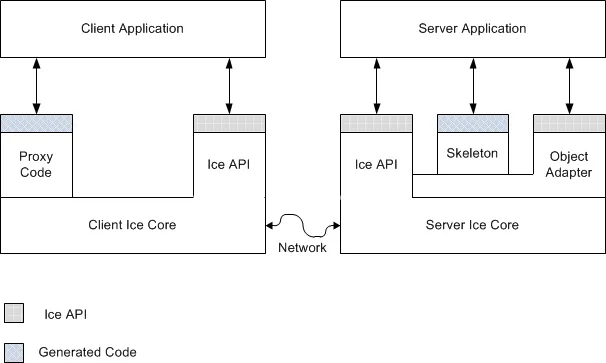
看一眼下面的框架,你就会发现,ICE框架其实与CORBA很相似。但ICE更加的简洁高效,并增加了很多现代框架的特性。同时,其开发组件更加易用,不需每种语言单独下载,学习成本相对较低。

Ice_Client_and_Server_Structure

ICE是典型CS架构,与CORBA相同,ICE帮我们处理的底层的网络通信及服务定位,我们只需要告诉ICE服务在哪里,需要哪个服务,调用参数是什么,然后就坐等处理结果就好咯。

使用ICE的时候,首先要先下载ICE的开发包,下载后直接解压就好了。
ICE下载地址

在使用ICE的时候,首先要用Slice语言,定义一个接口描述文件,比如我自己写了一个很简单的接口。
JustATest.ice

module JustATest
{ 
  interface iIceTest
  { 
    string SayHelloTo(string s);
    int Add(int a, int b);
  }; 
};

然后用对应语言的转化工具,将接口描述文件,转化为对应语言。

#设置环境变量
set ICE_HOME=C:\NeoArch\ZeroC\Ice-3.6.1
set PATH=%ICE_HOME%\bin;%PATH%

#转化为java
slice2java JustATest.ice

#转化为csharp
slice2cs JustATest.ice

那ICE的Client端,是如何找到Server,并告诉Server要调用哪个服务的呢?

//首先,Server在启动的时候,要指定Adapter的名称与端口
ic.createObjectAdapterWithEndpoints("NeoTestAdapter", "default -p 1900");
//然后,在Server端的Adapter上,要做一个类似于将服务名称与服务对象绑定的动作
adapter.add(obj,Ice.Util.stringToIdentity("NeoICETest"));

//当Client启动的时候,要指定端口及服务名称,这样就找到了
Ice.ObjectPrx obj = ic.stringToProxy("NeoICETest:default -p 1900");

那如果两个服务同名,只是端口不一致咋办呢?
你可以发现,无论是Client还是Server,无论是C#还是Java,都有类似的代码,你懂的。

        //C#
        public static readonly string[] ids__ =
        {
            "::Ice::Object",
            "::JustATest::iIceTest"
        };
    //java
    public static final String[] __ids =
    {
        "::Ice::Object",
        "::JustATest::iIceTest"
    };

在client段调用的时候,有checkedCast和uncheckedCast两种转换方式,说白了,checkedCast会先校验接口是否匹配,而uncheckedCast会直接强制转换不做任何校验。可以根据实际情况选用咯。

RMI简单示例

1、接口定义

package com.neohope.rmi.test;

import java.rmi.Remote;
import java.rmi.RemoteException;

/**
 * Created by Hansen
 */
public interface ITest extends Remote {
    /**
     * 返回“Hi XXX"字符串,必须声明抛出RemoteException异常
     * @return 返回“Hi XXX"字符串
     * @throws java.rmi.RemoteException
     */
    public String sayHiTo(String user) throws RemoteException;

    /**
     * 加法,必须声明抛出RemoteException异常
     * @param a
     * @parma b
     * @return a+b
     * @throws java.rmi.RemoteException
     */
    public int add(int a, int b) throws RemoteException;
}

2、服务端实现

package com.neohope.rmi.test;

import java.io.IOException;
import java.io.Serializable;
import java.net.MalformedURLException;
import java.rmi.AlreadyBoundException;
import java.rmi.Naming;
import java.rmi.RemoteException;
import java.rmi.registry.LocateRegistry;

/**
 * Created by Hansen
 */
public class TestServer implements ITest, Serializable {

    /**
     * 构造函数,必须声明抛出RemoteException异常
     *
     * @throws RemoteException
     */
    public TestServer() throws RemoteException {
    }

    /**
     * 返回“Hi XXX"字符串
     * @return 返回“Hi XXX"字符串
     * @throws java.rmi.RemoteException
     */
    @Override
    public String sayHiTo(String user) throws RemoteException {
        return "Hi " + user;
    }

    /**
     * 加法
     * @param a
     * @parma b
     * @return a+b
     * @throws java.rmi.RemoteException
     */
    @Override
    public int add(int a, int b) throws RemoteException {
        return a+b;
    }

    public static void main(String[] args) throws IOException, AlreadyBoundException {
        //创建一个远程对象
        ITest server = new TestServer();
        //注册端口
        LocateRegistry.createRegistry(1234);
        //绑定对象
        Naming.bind("rmi://localhost:1234/RemoteTest", server);

        System.in.read();
    }
}

3、客户端实现

package com.neohope.rmi.test;

import java.net.MalformedURLException;
import java.rmi.Naming;
import java.rmi.NotBoundException;
import java.rmi.RemoteException;

/**
 * Created by Hansen
 */
public class TestClient {
    public static void main(String args[]) throws RemoteException, NotBoundException, MalformedURLException {
        //查找服务,并调用方法
        ITest rservice = (ITest) Naming.lookup("rmi://localhost:1234/RemoteTest");
        System.out.println(rservice.sayHiTo("neohope"));
        System.out.println(rservice.add(1,2));
    }
}

C# Https Soap Client

1、Soap Https Soap Client

using System;
using System.Collections.Generic;
using System.Linq;
using System.Text;
using System.Net;
using System.Security.Cryptography.X509Certificates;
using System.Net.Security;

namespace IISSoapClientTest
{
    class Program
    {
        public static void HelloHttp(string url)
        {
            Hello h = new Hello(url);
            string ans = h.HelloWorld("C# http client");
            Console.WriteLine(ans);
            Console.WriteLine();
        }

        //同样的证书,IIS可以过,Tomcat过不去
        public static void HelloHttps(string url,String certPath)
        {
            X509CertificateCollection certs = new X509CertificateCollection();
            X509Certificate cert = X509Certificate.CreateFromCertFile(certPath);

            Hello h = new Hello(url);
            h.ClientCertificates.Add(cert);
            string ans = h.HelloWorld("C# https client");
            Console.WriteLine(ans);
            Console.WriteLine();
        }

        //绕过证书检查
        public static void HelloHttpsWithRemoteCertificateValidationCallback(string url)
        {
            //ServicePointManager.ServerCertificateValidationCallback = delegate { return true; };
            ServicePointManager.ServerCertificateValidationCallback = new System.Net.Security.RemoteCertificateValidationCallback(RemoteCertificateValidationCallback);

            Hello h = new Hello(url);
            string ans = h.HelloWorld("C# https client");
            Console.WriteLine(ans);
            Console.WriteLine();
        }

        private static bool RemoteCertificateValidationCallback(object sender, X509Certificate certificate, 
            X509Chain chain, SslPolicyErrors sslPolicyErrors)
        {
            return true;
        }  

        static void Main(string[] args)
        {
            //HelloHttp("http://127.0.0.1:80/Hello.asmx");
            //HelloHttps("https://127.0.0.1:443/Hello.asmx");
            //HelloHttpsWithRemoteCertificateValidationCallback("https://127.0.0.1:443/Hello.asmx");

            //HelloHttp("http://127.0.0.1:8080/SoapTest/services/HelloService");
            HelloHttps("https://127.0.0.1:8443/SoapTest/services/HelloService", @"D:\DiskE\Projects\VS2010\TestProjects\SSLSocket\myKeyStore.cer");
            //HelloHttpsWithRemoteCertificateValidationCallback("https://127.0.0.1:8443/SoapTest/services/HelloService");
        }
    }
}

Java Https Soap Server(Tomcat-Axis2)

1、%Tomcat%/server/server.xml
找到下面一段:

<!--
<Connector port="8443" protocol="HTTP/1.1" SSLEnabled="true"
               maxThreads="150" scheme="https" secure="true"
               clientAuth="false" sslProtocol="TLS" />
-->

替换为:

<Connector port="8443" protocol="org.apache.coyote.http11.Http11NioProtocol" SSLEnabled="true"  
	    maxThreads="150" scheme="https"  secure="true"
	    clientAuth="false" sslProtocol="TLS"
	    disableUploadTimeout="true" enableLookups="false"
	    keystoreFile="D:/JavaContainer/apache-tomcat-6.0.35-x86/myKeyStore.jks"
	    keystorePass="sslTestPwd"
/>

这样,就可以用https://127.0.0.1:8443访问Tomcat了。

2、在需要使用https项目的axis2.xml文件中,增加下面内容

        <!--修改-->
	<transportReceiver name="http"
		class="org.apache.axis2.transport.http.AxisServletListener">
		<parameter name="port">8080</parameter>
	</transportReceiver>
        <!--新增-->
	<transportReceiver name="https"
		class="org.apache.axis2.transport.http.AxisServletListener">
		<parameter name="port">8443</parameter>
	</transportReceiver>

这样,该WebService就可以使用https进行访问了:)

C# Https Soap Server(IIS7)

1、首先准备一个p12格式的服务端证书
无论是购买,还是用openssl或java keytool生成自签名证书都可以

2、在IIS7的根目录,选中“安全性->根目录证书”,选择“导入”即可

3、如果显示证书链有问题,则在IE中导入CA证书就好了

4、在需要HTTPS的网站上,选择“绑定”,绑定类型为https,选择需要的证书

5、在客户端的IE中,导入CA证书就好了

Java Https Soap Client(Axis2)

1、SoapClient

package com.neohope;

import java.net.URL;
import java.rmi.RemoteException;

public class SoapClientTest {
	
	public static void HelloHttp(String url) throws RemoteException
	{
		HelloStub h = new HelloStub(url);
		com.neohope.HelloStub.HelloWorld hello = new com.neohope.HelloStub.HelloWorld();
		hello.setName("Java http client");
		com.neohope.HelloStub.HelloWorldResponse rsp = h.helloWorld(hello);
		System.out.println(rsp.getHelloWorldResult());
	}
	
	public static void HelloHttps(String url,String trustStorePath,String trustStorePwd) throws RemoteException
	{
		URL jksurl = SoapClientTest.class.getClassLoader().getResource(
				"myTrustStore.jks");
		String jks = jksurl.getFile();
		System.setProperty("javax.net.ssl.trustStore", jks);
		System.setProperty("javax.net.ssl.trustStorePassword", trustStorePwd);
		
		HelloStub h = new HelloStub(url);
		com.neohope.HelloStub.HelloWorld hello = new com.neohope.HelloStub.HelloWorld();
		hello.setName("Java https client");
		com.neohope.HelloStub.HelloWorldResponse rsp = h.helloWorld(hello);
		System.out.println(rsp.getHelloWorldResult());
	}
	
	
	public static void main(String[] args) throws RemoteException
	{
		//HelloHttp("http://localhost:80/Hello.asmx");
		HelloHttps("https://localhost:443/Hello.asmx","myTrustStore.jks","sslTestPwd");
	}
}
2、SoapClientWithContextTest

package com.neohope;

import java.io.FileInputStream;
import java.io.FileNotFoundException;
import java.io.IOException;
import java.net.URL;
import java.rmi.RemoteException;
import java.security.KeyManagementException;
import java.security.KeyStore;
import java.security.KeyStoreException;
import java.security.NoSuchAlgorithmException;
import java.security.cert.CertificateException;

import javax.net.ssl.KeyManager;
import javax.net.ssl.SSLContext;
import javax.net.ssl.TrustManagerFactory;

public class SoapClientWithContextTest {
	
	public static void HelloHttp(String url) throws RemoteException
	{
		HelloStub h = new HelloStub(url);
		com.neohope.HelloStub.HelloWorld hello = new com.neohope.HelloStub.HelloWorld();
		hello.setName("Java http client");
		com.neohope.HelloStub.HelloWorldResponse rsp = h.helloWorld(hello);
		System.out.println(rsp.getHelloWorldResult());
	}
	
	public static void HelloHttps(String url,String trustStorePath,String trustStorePwd) throws NoSuchAlgorithmException, KeyManagementException, KeyStoreException, CertificateException, FileNotFoundException, IOException
	{
		URL jksurl = SoapClientTest.class.getClassLoader().getResource(
				"myTrustStore.jks");
		String jks = jksurl.getFile();
		
		KeyStore trustStore = KeyStore.getInstance("JKS");
		trustStore.load(new FileInputStream(jks), trustStorePwd.toCharArray());
		TrustManagerFactory trustManagerFactory = TrustManagerFactory.getInstance("SunX509");
		trustManagerFactory.init(trustStore);
        
		SSLContext sslContext = SSLContext.getInstance("TLSv1");
		//SSLContext sslContext = SSLContext.getInstance("SSLv3");
		
		sslContext.init(new KeyManager[0], trustManagerFactory.getTrustManagers(), null);
		SSLContext.setDefault(sslContext);
		
		HelloStub h = new HelloStub(url);
		com.neohope.HelloStub.HelloWorld hello = new com.neohope.HelloStub.HelloWorld();
		hello.setName("Java https client");
		com.neohope.HelloStub.HelloWorldResponse rsp = h.helloWorld(hello);
		System.out.println(rsp.getHelloWorldResult());
	}
	
	
	public static void main(String[] args) throws KeyManagementException, NoSuchAlgorithmException, KeyStoreException, CertificateException, FileNotFoundException, IOException
	{
		//HelloHttp("http://localhost:80/Hello.asmx");
		HelloHttps("https://localhost:443/Hello.asmx","myTrustStore.jks","sslTestPwd");
	}
}

3、SoapClientWithTrustManagerTest
可以绕过证书检查

package com.neohope;

import java.io.FileNotFoundException;
import java.io.IOException;
import java.rmi.RemoteException;
import java.security.KeyManagementException;
import java.security.KeyStoreException;
import java.security.NoSuchAlgorithmException;
import java.security.SecureRandom;
import java.security.cert.CertificateException;
import java.security.cert.X509Certificate;

import javax.net.ssl.KeyManager;
import javax.net.ssl.SSLContext;
import javax.net.ssl.TrustManager;
import javax.net.ssl.X509TrustManager;

public class SoapClientWithTrustManagerTest {
	
	public static void HelloHttp(String url) throws RemoteException
	{
		HelloStub h = new HelloStub(url);
		com.neohope.HelloStub.HelloWorld hello = new com.neohope.HelloStub.HelloWorld();
		hello.setName("Java http client");
		com.neohope.HelloStub.HelloWorldResponse rsp = h.helloWorld(hello);
		System.out.println(rsp.getHelloWorldResult());
	}
	
	public static void HelloHttps(String url,String trustStorePath,String trustStorePwd) throws NoSuchAlgorithmException, KeyManagementException, KeyStoreException, CertificateException, FileNotFoundException, IOException
	{        
		SSLContext sslContext = SSLContext.getInstance("TLSv1");
		//SSLContext sslContext = SSLContext.getInstance("SSLv3");
		
		sslContext.init(new KeyManager[0], new TrustManager[] { new DefaultTrustManager() }, new SecureRandom());
		SSLContext.setDefault(sslContext);
		
		HelloStub h = new HelloStub(url);
		com.neohope.HelloStub.HelloWorld hello = new com.neohope.HelloStub.HelloWorld();
		hello.setName("Java https client");
		com.neohope.HelloStub.HelloWorldResponse rsp = h.helloWorld(hello);
		System.out.println(rsp.getHelloWorldResult());
	}
	
	private static class DefaultTrustManager implements X509TrustManager {

		@Override
		public void checkClientTrusted(X509Certificate[] arg0, String arg1) throws CertificateException {
		}

		@Override
		public void checkServerTrusted(X509Certificate[] arg0, String arg1) throws CertificateException {
		}

		@Override
		public X509Certificate[] getAcceptedIssuers() {
			return null;
		}
	}
	
	
	public static void main(String[] args) throws KeyManagementException, NoSuchAlgorithmException, KeyStoreException, CertificateException, FileNotFoundException, IOException
	{
		//HelloHttp("http://localhost:80/Hello.asmx");
		HelloHttps("https://localhost:443/Hello.asmx","myTrustStore.jks","sslTestPwd");
	}
}