微软MVC实现REST风格编程

1、总体来说很简单,首先新建一个MVC框架的项目,模板选择WebAPI,这样就搞定80%了。

2、WebApiConfig.cs

using System;
using System.Collections.Generic;
using System.Linq;
using System.Web.Http;

namespace UrlToPngWebAPI
{
    public static class WebApiConfig
    {
        public static void Register(HttpConfiguration config)
        {
            config.Routes.MapHttpRoute(
                name: "DefaultApi",
                routeTemplate: "api/{controller}/{id}",
                defaults: new { id = RouteParameter.Optional }
            );

            config.EnableSystemDiagnosticsTracing();
        }
    }
}

3、RouteConfig.cs

using System;
using System.Collections.Generic;
using System.Linq;
using System.Web;
using System.Web.Mvc;
using System.Web.Routing;

namespace UrlToPngWebAPI
{
    public class RouteConfig
    {
        public static void RegisterRoutes(RouteCollection routes)
        {
            routes.MapRoute(
                name: "Default",
                url: "{controller}/{action}/{id}",
                defaults: new { controller = "Home", action = "Index", id = UrlParameter.Optional }
            );
        }
    }
}

4、请求结构
Web2PNGRequest.cs

using System;
using System.Collections.Generic;
using System.Linq;
using System.Web;
using Newtonsoft.Json;

namespace UrlToPngWebAPI.Models
{
    public class Web2PNGRequest
    {
        [JsonProperty]
        public String WebURL { get; set; }
        [JsonProperty]
        public String HeaderPath { get; set; }
        [JsonProperty]
        public String FooterPath { get; set; }
    }
}

5、返回结构
Web2PNGResponse.cs

using System;
using System.Collections.Generic;
using System.Linq;
using System.Web;
using System.Web.Mvc;
using Newtonsoft.Json;

namespace UrlToPngWebAPI.Models
{
    public class Web2PNGResponse
    {
        [JsonProperty]
        public int ErrorCode { get; set; }
        [JsonProperty]
        public String ErrorInfo { get; set; }
        [JsonProperty]
        public String PNGPath { get; set; }
    }
}

6、Controller
Url2PNGController.cs

using System;
using System.Collections.Generic;
using System.IO;
using System.Linq;
using System.Net;
using System.Net.Http;
using System.Text;
using System.Web.Helpers;
using System.Web.Http;
using Newtonsoft.Json;
using UrlToPngCsTest;
using UrlToPngWebAPI.Models;
using UrlToPngWebAPI.Pulgins;

namespace UrlToPngWebAPI.Controllers
{
    public class Url2PNGController : ApiController
    {
        // 返回输入参数示例
        public HttpResponseMessage Get()
        {
            Web2PNGRequest req = new Web2PNGRequest();
            req.WebURL = "webURL";
            req.HeaderPath = "headerPath";
            req.FooterPath = "footerPath";

            String jsonString = JsonConvert.SerializeObject(req);
            HttpResponseMessage result = new HttpResponseMessage { Content = new StringContent(jsonString, Encoding.GetEncoding("UTF-8"), "application/json") };
            return result;
        }

        // GET
        public HttpResponseMessage Get(String WebURL, String HeaderPath, String FooterPath)
        {
            UrlToPng4Web.InitUrlTOPng4CS();

            Web2PNGRequest req = new Web2PNGRequest();
            req.WebURL = WebURL;
            req.HeaderPath = HeaderPath;
            req.FooterPath = FooterPath;
            Web2PNGResponse rsp = UrlToPng4Web.UrlToPNG(req);
            
            String jsonString = JsonConvert.SerializeObject(rsp);
            HttpResponseMessage result = new HttpResponseMessage { Content = new StringContent(jsonString, Encoding.GetEncoding("UTF-8"), "application/json") };
            return result;
        }

        // POST
        public HttpResponseMessage Post(Web2PNGRequest req)
        {
            UrlToPng4Web.InitUrlTOPng4CS();

            Web2PNGResponse rsp = UrlToPng4Web.UrlToPNG(req);

            String jsonString = JsonConvert.SerializeObject(rsp);
            HttpResponseMessage result = new HttpResponseMessage { Content = new StringContent(jsonString, Encoding.GetEncoding("UTF-8"), "application/json") };
            return result;
        }
    }
}

Jersey实现REST风格编程

首先是服务端:
1、增加服务类

package com.neohope.jessery.test;

import javax.ws.rs.*;
import javax.ws.rs.core.MediaType;

/**
 * Created by Hansen
*/
@Path("neotest")
@Produces(MediaType.APPLICATION_JSON)
public class NeoTest {
    @GET
    @Path("/Add")
    public String Add(@QueryParam("a") int a,@QueryParam("b") int b) {
        return "{\"c\":" + (a+b) + "}";
    }

    @GET
    @Path("/SayHiTo")
    public String sayHiTo(@QueryParam("name") String name) {
        return "{\"msg\":\"hi " + name + "\"}";
    }
}

2、在web.xml里增加配置

    <servlet>
        <servlet-name>Jersey Web Application</servlet-name>
        <servlet-class>org.glassfish.jersey.servlet.ServletContainer</servlet-class>
        <init-param>
            <param-name>jersey.config.server.provider.packages</param-name>
            <param-value>com.neohope.jessery.test</param-value>
        </init-param>
    </servlet>

    <servlet-mapping>
        <servlet-name>Jersey Web Application</servlet-name>
        <url-pattern>/Rest/*</url-pattern>
    </servlet-mapping>

3、然后是客户端

package com.neohope.jessery.test;

import org.glassfish.jersey.client.ClientConfig;

import javax.ws.rs.client.Client;
import javax.ws.rs.client.ClientBuilder;
import javax.ws.rs.client.WebTarget;
import javax.ws.rs.core.Response;

/**
 * Created by Hansen
 */
public class ClientTest {
    public static void main(String[] args) {
        ClientConfig clientConfig = new ClientConfig();
        Client client = ClientBuilder.newClient(clientConfig);

        WebTarget target = client.target("http://localhost:8080/Rest/neotest/" + "Add");
        Response response = target.queryParam("a", 1).queryParam("b", 2).request().get();
        System.out.println(response.getStatus());
        System.out.println(response.readEntity(String.class));
        response.close();

        WebTarget target1 = client.target("http://localhost:8080/Rest/neotest/" + "SayHiTo");
        Response response1 = target1.queryParam("name", "neohope").request().get();
        System.out.println(response1.getStatus());
        System.out.println(response1.readEntity(String.class));
        response1.close();
    }
}

WCF自托管服务

一般有两种方式实现:

1、通过代码设置直接实现

using System;
using System.Collections.Generic;
using System.Linq;
using System.ServiceModel;
using System.ServiceModel.Description;
using System.Text;
using WcfTest;

namespace WcfHosting
{
    internal class Program
    {
        private static void Main(string[] args)
        {
            using (ServiceHost host = new ServiceHost(typeof (SoapService)))
            {
                host.AddServiceEndpoint(typeof(ISoapService), new WSHttpBinding(), "http://127.0.0.1:1234/neohope");

                if (host.Description.Behaviors.Find<ServiceMetadataBehavior>() == null)
                {
                    ServiceMetadataBehavior behavior = new ServiceMetadataBehavior();
                    behavior.HttpGetEnabled = true;
                    behavior.HttpGetUrl = new Uri("http://127.0.0.1:9999/neohope/metadata");
                    host.Description.Behaviors.Add(behavior);
                }

                host.Opened += delegate
                {
                    Console.WriteLine("service started, press enter to exit.");
                };
                host.Open();
                Console.Read();
            }
        }
    }
}

2、通过配置文件实现

using System;
using System.Collections.Generic;
using System.Linq;
using System.ServiceModel;
using System.ServiceModel.Description;
using System.Text;
using WcfTest;

namespace WcfHosting
{
    internal class Program
    {
        private static void Main(string[] args)
        {
            using (ServiceHost host = new ServiceHost(typeof (SoapService)))
            {
                host.Opened += delegate
                {
                    Console.WriteLine("service started, press enter to exit.");
                };
                host.Open();
                Console.Read();
            }
        }
    }
}

app.config

<?xml version="1.0" encoding="utf-8" ?>
<configuration>
  <system.serviceModel>
    <behaviors>
      <serviceBehaviors>
        <behavior name="metadataBehavior">
          <serviceMetadata httpGetEnabled="true" httpGetUrl="http://127.0.0.1:9999/neohope/metadata" />
        </behavior>
      </serviceBehaviors>
    </behaviors>
    <services>
      <service behaviorConfiguration="metadataBehavior" name="WcfTest.SoapService">
        <endpoint address="http://127.0.0.9999/neohope" binding="wsHttpBinding"
                  contract="WcfTest.ISoapService" />
      </service>
    </services>
  </system.serviceModel>
</configuration>

WCF修改SOAP命名空间

有三个地方可以修改SOAP的命名空间:

1、ServiceContract

using System;
using System.Collections.Generic;
using System.Linq;
using System.Runtime.Serialization;
using System.ServiceModel;
using System.ServiceModel.Web;
using System.Text;
using System.Web.Configuration;

namespace WcfTest
{
    // NOTE: You can use the "Rename" command on the "Refactor" menu to change the interface name "IService1" in both code and config file together.
    [ServiceContract(Name="SoapService",Namespace="http://wcftest.neohope.org")]
    public interface ISoapService
    {
        [OperationContract]
        [WebInvoke(Method = "GET", UriTemplate = "User/Get/{uid}", BodyStyle = WebMessageBodyStyle.Bare, ResponseFormat = WebMessageFormat.Json, RequestFormat = WebMessageFormat.Json)]
        NUser GetUser(String uid);

        [OperationContract]
        [WebInvoke(Method = "POST", UriTemplate = "/User", BodyStyle = WebMessageBodyStyle.Bare, ResponseFormat = WebMessageFormat.Json, RequestFormat = WebMessageFormat.Json)]
        string UpdateUser(NUser newuser);


        [OperationContract]
        [WebInvoke(Method = "PUT", UriTemplate = "/User", BodyStyle = WebMessageBodyStyle.Bare, ResponseFormat = WebMessageFormat.Json, RequestFormat = WebMessageFormat.Json)]
        string AddUser(NUser newuser);


        [OperationContract]
        [WebInvoke(Method = "DELETE", UriTemplate = "/User", BodyStyle = WebMessageBodyStyle.Bare, ResponseFormat = WebMessageFormat.Json, RequestFormat = WebMessageFormat.Json)]
        string DeleteUser(String uid);
    }

    [ServiceBehavior(Name = "SoapService", Namespace = "http://wcftest.neohope.org")]
    [DataContract]
    public class NUser
    {
        string uid = "";
        string uname = "";
        string usex = "";

        [DataMember]
        public String Uid
        {
            get { return uid; }
            set { uid = value; }
        }

        [DataMember]
        public string UName
        {
            get { return uname; }
            set { uname = value; }
        }

        [DataMember]
        public string USex
        {
            get { return usex; }
            set { usex = value; }
        }
    }
}

2、服务实现

using System;
using System.Collections.Generic;
using System.Linq;
using System.Runtime.Serialization;
using System.ServiceModel;
using System.ServiceModel.Web;
using System.Text;

namespace WcfTest
{
    [ServiceBehavior(Name = "SoapService", Namespace = "http://wcftest.neohope.org")]
   public class SoapService : ISoapService
    {
        static List<NUser> users = new List<NUser>();

        static SoapService()
        {
            NUser aNUser = new NUser();
            aNUser.Uid = "001";
            aNUser.UName = "张三";
            aNUser.USex = "男";
            users.Add(aNUser);
        }

        public NUser GetUser(string uid)
        {
            foreach (NUser nuser in users)
            {
                if (nuser.Uid == uid)
                {
                    return nuser;
                }
            }

            return null;
        }

        public string UpdateUser(NUser newuser)
        {
            if (newuser == null)
            {
                return "nuewuser is null";
            }

            foreach (NUser nuser in users)
            {
                if (nuser.Uid == newuser.Uid)
                {
                    nuser.UName = newuser.UName;
                    newuser.USex = nuser.USex;
                    return "User updated";
                }
            }

            return "User not found";
        }

        public string AddUser(NUser newuser)
        {
            if (newuser == null)
            {
                return "nuewuser is null";
            }

            foreach (NUser nuser in users)
            {
                if (nuser.Uid == newuser.Uid)
                {
                    nuser.UName = newuser.UName;
                    newuser.USex = nuser.USex;
                    return "User updated";
                }
            }

            users.Add(newuser);

            return "User added";
        }

        public string DeleteUser(String uid)
        {
            bool bFound = false;
            for(int i=users.Count-1;i>=0;i--)
            {
                if (users[i].Uid == uid)
                {
                    bFound = true;
                    users.RemoveAt(i);
                }
            }

            if (!bFound)
            {
                return "User Not Found";
            }
            else
            {
                return "User Deleted";
            }
        }
    }
}

3、Web.config

<?xml version="1.0"?>
<configuration>
  
  <system.web>
    <compilation debug="true" targetFramework="4.0" />
  </system.web>
  
  <system.serviceModel>

    <services>
      <service name="WcfTest.SoapService">
        <endpoint binding="webHttpBinding" contract="WcfTest.ISoapService" bindingNamespace="http://wcftest.neohope.org"/>
      </service>
    </services>
 
    <behaviors>
      <endpointBehaviors>
      </endpointBehaviors>
      
      <serviceBehaviors>
        <behavior name="">
          <serviceMetadata httpGetEnabled="true" />
          <serviceDebug includeExceptionDetailInFaults="true" />
        </behavior>
      </serviceBehaviors>
    </behaviors>
    
    <serviceHostingEnvironment aspNetCompatibilityEnabled="false" multipleSiteBindingsEnabled="true" />
  </system.serviceModel>
  
  <system.webServer>
    <modules runAllManagedModulesForAllRequests="true"/>
    <directoryBrowse enabled="true"/>
  </system.webServer>
</configuration>

WCF实现REST风格编程

1、首先需要一个ServiceContract

using System;
using System.Collections.Generic;
using System.Linq;
using System.Runtime.Serialization;
using System.ServiceModel;
using System.ServiceModel.Web;
using System.Text;

namespace WcfTest
{
    [ServiceContract]
    public interface IRestService
    {
        [OperationContract]
        [WebInvoke(Method = "GET", UriTemplate = "User/Get/{uid}", BodyStyle = WebMessageBodyStyle.Bare, ResponseFormat = WebMessageFormat.Json, RequestFormat = WebMessageFormat.Json)]
        NUser GetUser(String uid);


        [OperationContract]
        [WebInvoke(Method = "POST", UriTemplate = "/User", BodyStyle = WebMessageBodyStyle.Bare, ResponseFormat = WebMessageFormat.Json, RequestFormat = WebMessageFormat.Json)]
        string UpdateUser(NUser newuser);


        [OperationContract]
        [WebInvoke(Method = "PUT", UriTemplate = "/User", BodyStyle = WebMessageBodyStyle.Bare, ResponseFormat = WebMessageFormat.Json, RequestFormat = WebMessageFormat.Json)]
        string AddUser(NUser newuser);


        [OperationContract]
        [WebInvoke(Method = "DELETE", UriTemplate = "/User", BodyStyle = WebMessageBodyStyle.Bare, ResponseFormat = WebMessageFormat.Json, RequestFormat = WebMessageFormat.Json)]
        string DeleteUser(String uid);
    }

    [DataContract]
    public class NUser
    {
        string uid = "";
        string uname = "";
        string usex = "";

        [DataMember]
        public String Uid
        {
            get { return uid; }
            set { uid = value; }
        }

        [DataMember]
        public string UName
        {
            get { return uname; }
            set { uname = value; }
        }

        [DataMember]
        public string USex
        {
            get { return usex; }
            set { usex = value; }
        }
    }
}


2、然后需要实现服务

using System;
using System.Collections.Generic;
using System.Linq;
using System.Runtime.Serialization;
using System.ServiceModel;
using System.ServiceModel.Activation;
using System.ServiceModel.Web;
using System.Text;

namespace WcfTest
{
    public class RestService : IRestService
    {
        static List<NUser> users = new List<NUser>();

        static RestService()
        {
            NUser aNUser = new NUser();
            aNUser.Uid = "001";
            aNUser.UName = "张三";
            aNUser.USex = "男";
            users.Add(aNUser);
        }

        public NUser GetUser(string uid)
        {
            foreach (NUser nuser in users)
            {
                if (nuser.Uid == uid)
                {
                    return nuser;
                }
            }

            return null;
        }

        public string UpdateUser(NUser newuser)
        {
            if (newuser == null)
            {
                return "nuewuser is null";
            }

            foreach (NUser nuser in users)
            {
                if (nuser.Uid == newuser.Uid)
                {
                    nuser.UName = newuser.UName;
                    newuser.USex = nuser.USex;
                    return "User updated";
                }
            }

            return "User not found";
        }

        public string AddUser(NUser newuser)
        {
            if (newuser == null)
            {
                return "nuewuser is null";
            }

            foreach (NUser nuser in users)
            {
                if (nuser.Uid == newuser.Uid)
                {
                    nuser.UName = newuser.UName;
                    newuser.USex = nuser.USex;
                    return "User updated";
                }
            }

            users.Add(newuser);

            return "User added";
        }

        public string DeleteUser(String uid)
        {
            bool bFound = false;
            for(int i=users.Count-1;i>=0;i--)
            {
                if (users[i].Uid == uid)
                {
                    bFound = true;
                    users.RemoveAt(i);
                }
            }

            if (!bFound)
            {
                return "User Not Found";
            }
            else
            {
                return "User Deleted";
            }
        }
    }
}

3、修改服务的Markup

<%@ ServiceHost Language="C#" Debug="true" Service="WcfTest.RestService" CodeBehind="RestService.svc.cs" 
    Factory="System.ServiceModel.Activation.WebServiceHostFactory"%>

4、修改服务配置
添加serviceBehaviors、endpointBehaviors、service、endpoint

<?xml version="1.0"?>
<configuration>
  
  <system.web>
    <compilation debug="true" targetFramework="4.0" />
  </system.web>
  
  <system.serviceModel>
    <services>
      <service behaviorConfiguration="RestSvcBehavior" name="WcfTest.RestService">
        <endpoint binding="webHttpBinding" contract="WcfTest.IRestService" address="" behaviorConfiguration="RestEPBehavior"/>
      </service>
    </services>
 
    <behaviors>
      <endpointBehaviors>
        <behavior name="RestEPBehavior">
          <webHttp />
        </behavior>
      </endpointBehaviors>
      
      <serviceBehaviors>
        <behavior name="RestSvcBehavior">
          <serviceMetadata httpGetEnabled="true" />
          <serviceDebug includeExceptionDetailInFaults="true" />
        </behavior>
        <behavior name="">
          <serviceMetadata httpGetEnabled="true" />
          <serviceDebug includeExceptionDetailInFaults="true" />
        </behavior>
      </serviceBehaviors>
    </behaviors>
    
    <serviceHostingEnvironment aspNetCompatibilityEnabled="false" multipleSiteBindingsEnabled="true" />
  </system.serviceModel>
  
  <system.webServer>
    <modules runAllManagedModulesForAllRequests="true"/>
    <directoryBrowse enabled="true"/>
  </system.webServer>
</configuration>

5、访问服务

http://ip:port/RestService.svc/User/Get/001

通过LDAP初步理解JNDI

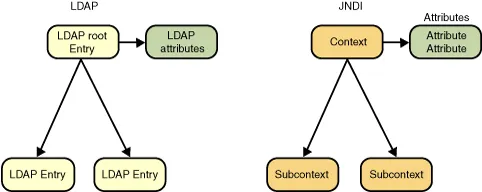
LDAP与JNDI模型对比
jndi-ldap-model

1、LdapBinder
这个类的主要功能是,把消息放到一个预设的LDAP路径

package com.neohope.jndi.test;

import javax.naming.Binding;
import javax.naming.Context;
import javax.naming.NamingEnumeration;
import javax.naming.directory.DirContext;
import javax.naming.directory.InitialDirContext;
import java.util.Hashtable;

/**
 * Created by Hansen
 */
public class LdapBinder {

    public static void main(String[] args) {
        try {
            final Hashtable jndiProperties = new Hashtable();
            jndiProperties.put(Context.INITIAL_CONTEXT_FACTORY, "com.sun.jndi.fscontext.RefFSContextFactory");
            jndiProperties.put(Context.PROVIDER_URL, "file:///d:/Downloads/ldap");
            //jndiProperties.put(Context.INITIAL_CONTEXT_FACTORY, "com.sun.jndi.ldap.LdapCtxFactory");
            //jndiProperties.put(Context.PROVIDER_URL, "ldap://localhost:389");
            //jndiProperties.put(Context.SECURITY_PRINCIPAL,"cn=Directory Manager");
            //jndiProperties.put(Context.SECURITY_CREDENTIALS,"password");

            DirContext ctx = new InitialDirContext(jndiProperties);
            NeoLdapMsgRef msgRef = new NeoLdapMsgRef("Ldap Text");
            ctx.bind("cn=anobject", msgRef);
            //ctx.unbind("cn=anobject");

            /*
            NamingEnumeration list = ctx.list("/");
            while (list.hasMore()) {
                NameClassPair nc = (NameClassPair) list.next();
                System.out.println(nc);
            }
            */

            NamingEnumeration list = ctx.listBindings("/");
            while (list.hasMore()) {
                Binding binding = (Binding)list.next();
                System.out.println(binding.getName() + " " +binding.getObject()
                );
            }

            ctx.close();
        } catch (Exception e) {
            e.printStackTrace();
        }
    }
}

2、LdapReader
这个类的主要功能是,从预设的LDAP路径读取消息

package com.neohope.jndi.test;

import javax.naming.Context;
import javax.naming.directory.DirContext;
import javax.naming.directory.InitialDirContext;
import java.util.Hashtable;

/**
 * Created by Hansen
 */
public class LdapReader {

    public static void main(String[] args) {
        try {
            final Hashtable jndiProperties = new Hashtable();
            jndiProperties.put(Context.INITIAL_CONTEXT_FACTORY, "com.sun.jndi.fscontext.RefFSContextFactory");
            jndiProperties.put(Context.PROVIDER_URL, "file:///d:/Downloads/ldap");

            //jndiProperties.put(Context.INITIAL_CONTEXT_FACTORY, "com.sun.jndi.ldap.LdapCtxFactory");
            //jndiProperties.put(Context.PROVIDER_URL, "ldap://localhost:389");
            //jndiProperties.put(Context.SECURITY_PRINCIPAL,"cn=Directory Manager");
            //jndiProperties.put(Context.SECURITY_CREDENTIALS,"password");

            DirContext ctx = new InitialDirContext(jndiProperties);
            NeoLdapMsgRef msgRef = (NeoLdapMsgRef)ctx.lookup("cn=anobject");
            ctx.close();

            System.out.println(msgRef.message);

        } catch (Exception e) {
            e.printStackTrace();
        }
    }
}

3、LdapMonitor
这个类的主要功能是,监视LDAP路径下内容变动

package com.neohope.jndi.test;

import javax.naming.Context;
import javax.naming.directory.DirContext;
import javax.naming.directory.InitialDirContext;
import javax.naming.event.*;
import javax.naming.ldap.UnsolicitedNotificationEvent;
import javax.naming.ldap.UnsolicitedNotificationListener;
import java.util.Hashtable;

/**
 * Created by Hansen
 * 条件所限,没有进行测试
 */
public class LdapMonitor {

    public static void main(String[] args) {
        try {
            final Hashtable jndiProperties = new Hashtable();
            jndiProperties.put(Context.INITIAL_CONTEXT_FACTORY, "com.sun.jndi.ldap.LdapCtxFactory");
            jndiProperties.put(Context.PROVIDER_URL, "ldap://localhost:389");
            jndiProperties.put(Context.SECURITY_PRINCIPAL,"cn=Manager");
            jndiProperties.put(Context.SECURITY_CREDENTIALS,"password");

            DirContext ctx = new InitialDirContext(jndiProperties);
            EventDirContext enentCtx=(EventDirContext)(ctx.lookup("/"));

            NamingListener unsolListener = new UnsolicitedNotificationListener() {
                public void notificationReceived(UnsolicitedNotificationEvent evt) {
                    System.out.println("received: " + evt + ",notification:" + evt.getNotification());
                }

                public void namingExceptionThrown(NamingExceptionEvent evt) {
                    System.out.println(">>> UnsolListener got an exception");
                    evt.getException().printStackTrace();
                }
            };

            NamingListener namespaceListener = new NamespaceChangeListener() {
                public void objectAdded(NamingEvent evt) {
                    System.out.println("objectAdded: " + evt.getOldBinding() + "\n=> " + evt.getNewBinding());
                    System.out.println("\tchangeInfo: " + evt.getChangeInfo());
                }

                public void objectRemoved(NamingEvent evt) {
                    System.out.println("objectRemoved: " + evt.getOldBinding() + "\n=> " + evt.getNewBinding());
                    System.out.println("\tchangeInfo: " + evt.getChangeInfo());
                }

                public void objectRenamed(NamingEvent evt) {
                    System.out.println("objectRenamed: " + evt.getOldBinding() + "\n=> " + evt.getNewBinding());
                    System.out.println("\tchangeInfo: " + evt.getChangeInfo());
                }

                public void namingExceptionThrown(NamingExceptionEvent evt) {
                    System.err.println(">>>NamespaceChangeListener Exception");
                    evt.getException().printStackTrace();
                }
            };

            NamingListener objectListener = new ObjectChangeListener() {
                public void objectChanged(NamingEvent evt) {
                    System.out.println("objectChanged: " + evt.getOldBinding() + "\n\t=> " + evt.getNewBinding());
                    System.out.println("\tchangeInfo: " + evt.getChangeInfo());
                }

                public void namingExceptionThrown(NamingExceptionEvent evt) {
                    System.err.println(">>>ObjectChangeListener Exception");
                    evt.getException().printStackTrace();
                }
            };

            enentCtx.addNamingListener("", EventContext.SUBTREE_SCOPE, unsolListener);
            enentCtx.addNamingListener("", EventContext.SUBTREE_SCOPE, namespaceListener);
            enentCtx.addNamingListener("", EventContext.SUBTREE_SCOPE, objectListener);

            System.in.read();

            //enentCtx.close();
            ctx.close();
        } catch (Exception e) {
            e.printStackTrace();
        }
    }
}

4、NeoLdapMsgRef

package com.neohope.jndi.test;

import javax.naming.NamingException;
import javax.naming.Reference;
import javax.naming.Referenceable;
import javax.naming.StringRefAddr;

/**
 * Created by Hansen
 */
public class NeoLdapMsgRef implements Referenceable {
    public String message = "";

    public NeoLdapMsgRef(String message)
    {
        this.message = message;
    }

    @Override
    public Reference getReference() throws NamingException {
        Reference ref = new Reference(this.getClass().getName(), NeoLdapMsgRefFactory.class.getName(), null);
        ref.add(new StringRefAddr("msg", message));
        return ref;
    }
}

5、NeoLdapMsgRefFactory

package com.neohope.jndi.test;

import javax.naming.*;
import javax.naming.spi.ObjectFactory;
import java.util.Hashtable;

/**
 * Created by Hansen
 */
public class NeoLdapMsgRefFactory implements ObjectFactory {
    @Override
    public Object getObjectInstance(Object obj, Name name, Context nameCtx, Hashtable<?, ?> environment) throws Exception {
        if (obj instanceof Reference) {
            Reference ref = (Reference) obj;
            String msg = (String) ref.get("msg").getContent();
            NeoLdapMsgRef msgRef = new NeoLdapMsgRef(msg);
            return msgRef;
        }
        else {
            return null;
        }
    }
}

LADP常用函数

LADP操作 解释 JNDI函数
Search Search directory for matching directory entries DirContext.search()
Compare Compare directory entry to a set of attributes DirContext.search()
Add Add a new directory entry DirContext.bind(), DirContext.createSubcontext()
Modify Modify a particular directory entry DirContext.modifyAttributes()
Delete Delete a particular directory entry Context.unbind(), Context.destroySubcontext()
Rename Rename or modify the DN Context.rename()
Bind Start a session with an LDAP server new InitialDirContext()
Unbind End a session with an LDAP server Context.close()
Abandon Abandon an operation previously sent to the server Context.close(), NamingEnumneration.close()
Extended Extended operations command LdapContext.extendedOperation()

LADP查询常用符号

o Organization
ou Organizational unit
cn Common name
sn Surname
givenname First name
uid Userid
dn Distinguished name
mail Email address

LADP查询常用操作符

符号 含义 示例 匹配示例
~ Approximate (sn~=Tyagi) Tyagi or variations in spelling
= Equality (sn=Tyagi) Surname of Tyagi only
> Greater than (sn=Tyagi) Any surname that alphabetically follows Tyagi
>= Greater than or equal to (sn>=Tyagi) Any surname that includes or alphabetically follows Tyagi
< Less than (sn Any surname that alphabetically precedes Tyagi
<= Less than or equal to (sn<=Tyagi) Any surname that includes or alphabetically precedes Tyagi
=* Presence (sn=*) All surnames (all entries with the sn attribute)
Substring (sn=Tya*), (sn=*yag*), (sn=Ty*g*) Any matching string, substring, or superstring that matches Tyagi
& And (&(sn=Tyagi) (cn=Sameer Tyagi)) Any entry that matches both surname of Tyagi and a common name of Sameer Tyagi
| Or (|(sn=Tyagi) (cn=Sameer Tyagi)) Any entry that matches either surname of Tyagi or a common name of Sameer Tyagi
! Not (!(sn=Tyagi)) Any entry other than that with a surname of Tyagi

通过JMS初步理解JNDI

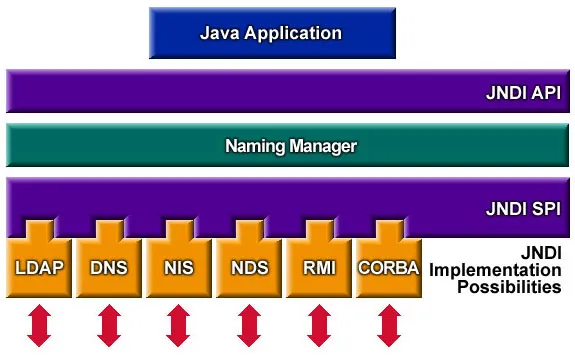
JNDI服务模型
jndi-model

1、服务端

package com.neohope.jndi.test;

import javax.naming.Context;
import javax.naming.InitialContext;
import javax.naming.NamingException;
import java.io.IOException;
import java.rmi.RemoteException;
import java.rmi.registry.LocateRegistry;
import java.util.Hashtable;

/**
 * Created by Hansen on 2016/5/4.
 */
public class Server {
    private static InitialContext ctx;

    public static void initJNDI() {
        try {
            LocateRegistry.createRegistry(1234);
            final Hashtable jndiProperties = new Hashtable();
            jndiProperties.put(Context.INITIAL_CONTEXT_FACTORY, "com.sun.jndi.rmi.registry.RegistryContextFactory");
            jndiProperties.put(Context.PROVIDER_URL, "rmi://localhost:1234");
            ctx = new InitialContext(jndiProperties);
        } catch (NamingException e) {
            e.printStackTrace();
        } catch (RemoteException e) {
            e.printStackTrace();
        }
    }

    public static void bindJNDI(String name, Object obj) throws NamingException {
        ctx.bind(name, obj);
    }

    public static void unInitJNDI() throws NamingException {
        ctx.close();
    }

    public static void main(String[] args) throws NamingException, IOException {
        initJNDI();
        NeoMessage msg = new NeoMessage("Just A Message");
        bindJNDI("java:com/neohope/jndi/test01", msg);
        System.in.read();
        unInitJNDI();
    }
}

2、客户端

package com.neohope.jndi.test;

import javax.naming.Context;
import javax.naming.InitialContext;
import javax.naming.NamingException;
import java.util.Hashtable;

/**
 * Created by Hansen
 */
public class Client {
    public static void main(String[] args) throws NamingException {
        final Hashtable jndiProperties = new Hashtable();
        jndiProperties.put(Context.INITIAL_CONTEXT_FACTORY, "com.sun.jndi.rmi.registry.RegistryContextFactory");
        jndiProperties.put(Context.PROVIDER_URL, "rmi://localhost:1234");

        InitialContext ctx = new InitialContext(jndiProperties);
        NeoMessage msg = (NeoMessage) ctx.lookup("java:com/neohope/jndi/test01");
        System.out.println(msg.message);
        ctx.close();
    }
}

3、NeoMessage

package com.neohope.jndi.test;

import java.io.Serializable;
import java.rmi.Remote;

/**
 * Created by Hansen
 */
public class NeoMessage implements Remote, Serializable {
    public String message = "";

    public NeoMessage(String message)
    {
        this.message = message;
    }
}

大家可以看出,在这个简单的例子中:
1、服务端仅仅是把数据生成好,放到了LocateRegistry中。
2、而客户端,通过JNDI查到消息,获取到了对应的数据。
3、LocateRegistry完成了跨JVM/主机通讯的任务

反过来思考一下,对于JNDIL是不是更清楚一些了呢?
那再思考一下,那J2EE容器中的数据源是如何统一管理的呢?

JBoss EAP JMS的调用(Queue)

通讯流程图
jms-point-to-point-model.webp

首先是Server端的开发及设置:
1、增加一个用户:

bin\add-user.bat

用户名密码随便,但要属于guest组

2、启动Server

standalone.bat -server-config=standalone-full.xml 

3、新建Queue

jboss-cli.bat --connect
jms-queue add --queue-address=jmsQueue --entries=queue/jmsQueue,java:jboss/exported/jms/queue/jmsQueue

到这里服务端已经完成了。

然后是客户端的设置:
1、Sender

package com.neohope.jms.test;

import javax.jms.*;
import javax.naming.Context;
import javax.naming.InitialContext;
import javax.naming.NamingException;
import java.util.Hashtable;

/**
 * Created by Hansen
 */
public class TestQueueSender {
    public static void main(String[] args) throws NamingException, JMSException {

        final Hashtable jndiProperties = new Hashtable();
        jndiProperties.put(Context.INITIAL_CONTEXT_FACTORY, "org.jboss.naming.remote.client.InitialContextFactory");
        jndiProperties.put(Context.PROVIDER_URL, "remote://localhost:4447");
        final InitialContext ctx = new InitialContext(jndiProperties);

        QueueConnectionFactory factory = (QueueConnectionFactory) ctx.lookup("jms/RemoteConnectionFactory");
        QueueConnection connection = factory.createQueueConnection("user001", "user001#");
        QueueSession session = connection.createQueueSession(false, QueueSession.AUTO_ACKNOWLEDGE);

        Queue queue = (Queue) ctx.lookup("jms/queue/jmsQueue");
        TextMessage msg = session.createTextMessage("Queue Test Messagee");
        QueueSender sender = session.createSender(queue);
        sender.send(msg);


        session.close();
        connection.close();
    }
}

2、Receiver

package com.neohope.jms.test;

import javax.jms.*;
import javax.naming.Context;
import javax.naming.InitialContext;
import javax.naming.NamingException;
import java.io.IOException;
import java.util.Hashtable;

/**
 * Created by Hansen
 */
public class TestQueueReceiver {
    public static void main(String[] args) throws NamingException, JMSException, IOException {

        final Hashtable jndiProperties = new Hashtable();
        jndiProperties.put(Context.INITIAL_CONTEXT_FACTORY, "org.jboss.naming.remote.client.InitialContextFactory");
        jndiProperties.put(Context.PROVIDER_URL, "remote://localhost:4447");
        final InitialContext ctx = new InitialContext(jndiProperties);

        QueueConnectionFactory factory = (QueueConnectionFactory) ctx.lookup("jms/RemoteConnectionFactory");
        QueueConnection connection = factory.createQueueConnection("user001", "user001#");
        QueueSession session = connection.createQueueSession(false, QueueSession.AUTO_ACKNOWLEDGE);

        Queue queue = (Queue) ctx.lookup("jms/queue/jmsQueue");
        QueueReceiver receiver = session.createReceiver(queue);
        receiver.setMessageListener(new MessageListener() {
            public void onMessage(Message message) {
                try{
                    TextMessage msg=(TextMessage)message;
                    System.out.println("Queue message received:"+msg.getText());
                }
                catch(JMSException e)
                {
                    System.out.println(e);
                }
            }});

        connection.start();
        System.in.read();

        session.close();
        connection.close();
    }
}

JBoss EAP JMS的调用(Topic)

通讯流程图
jms-publisher-subscriber-model.webp

首先是Server端的开发及设置:
1、增加一个用户:

bin\add-user.bat

用户名密码随便,但要属于guest组

2、启动Server

standalone.bat -server-config=standalone-full.xml 

3、新建Topic

jboss-cli.bat --connect
jms-topic add --topic-address=jmsTopic --entries=topic/jmsTopic,java:jboss/exported/jms/topic/jmsTopic

到这里服务端已经完成了。

然后是客户端的设置:
1、Publisher

package com.neohope.jms.test;

import javax.jms.*;
import javax.naming.Context;
import javax.naming.InitialContext;
import javax.naming.NamingException;
import java.util.Hashtable;

/**
 * Created by Hansen
 */
public class TestTopicPublisher {
    public static void main(String[] args) throws NamingException, JMSException {
        final Hashtable jndiProperties = new Hashtable();
        jndiProperties.put(Context.INITIAL_CONTEXT_FACTORY, "org.jboss.naming.remote.client.InitialContextFactory");
        jndiProperties.put(Context.PROVIDER_URL, "remote://localhost:4447");
        final InitialContext ctx = new InitialContext(jndiProperties);


        TopicConnectionFactory factory = (TopicConnectionFactory) ctx.lookup("jms/RemoteConnectionFactory");
        TopicConnection connection = factory.createTopicConnection("user001", "user001#");
        TopicSession session = connection.createTopicSession(false, TopicSession.AUTO_ACKNOWLEDGE);

        Topic topic = (Topic) ctx.lookup("jms/topic/jmsTopic");
        TextMessage msg = session.createTextMessage("Topic Test Message");
        TopicPublisher publisher = session.createPublisher(topic);
        publisher.publish(msg);

        session.close();
        connection.close();
    }
}

2、Subscriber

package com.neohope.jms.test;

import javax.jms.*;
import javax.naming.Context;
import javax.naming.InitialContext;
import javax.naming.NamingException;
import java.io.IOException;
import java.util.Hashtable;

/**
 * Created by Hansen
 */
public class TestTopicSubscriber {
    public static void main(String[] args) throws NamingException, JMSException, IOException {
        final Hashtable jndiProperties = new Hashtable();
        jndiProperties.put(Context.INITIAL_CONTEXT_FACTORY, "org.jboss.naming.remote.client.InitialContextFactory");
        jndiProperties.put(Context.PROVIDER_URL, "remote://localhost:4447");
        final InitialContext ctx = new InitialContext(jndiProperties);


        TopicConnectionFactory factory = (TopicConnectionFactory) ctx.lookup("jms/RemoteConnectionFactory");
        TopicConnection connection = factory.createTopicConnection("user001", "user001#");
        TopicSession session = connection.createTopicSession(false, TopicSession.AUTO_ACKNOWLEDGE);

        Topic topic = (Topic) ctx.lookup("jms/topic/jmsTopic");
        TopicSubscriber subscriber = session.createSubscriber(topic);
        subscriber.setMessageListener(new MessageListener() {
            public void onMessage(Message message) {
                try {
                    TextMessage msg = (TextMessage) message;
                    System.out.println("Topic message received:" + msg.getText());
                } catch (JMSException e) {
                    System.out.println(e);
                }
            }
        });

        connection.start();
        System.in.read();

        session.close();
        connection.close();
    }
}

使用Dubbo实现RPC简单示例02

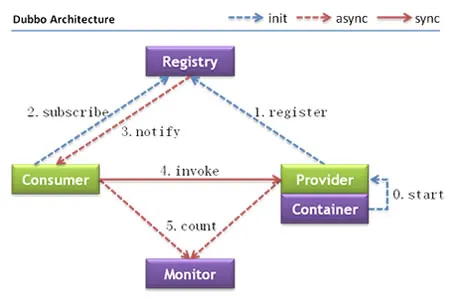
简单的Dubbo RPC调用描述如下:
dubbo-arch

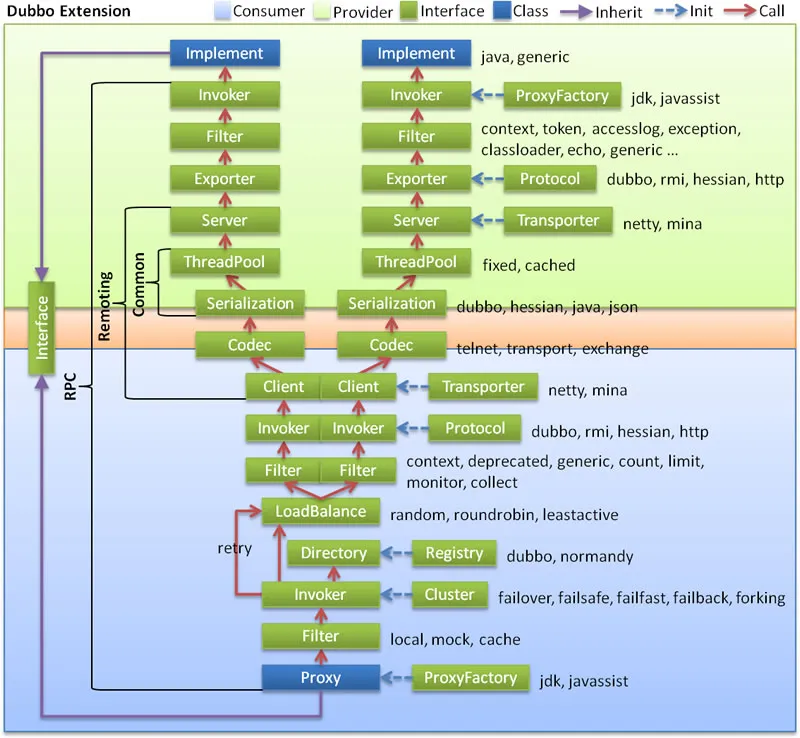
复杂的Dubbo RPC调用描述如下:
dubbo-arch-ext

在这里我们先用zookeeper来做registry,做一个简单的例子:

一、首先是zookeeper:
1、到zookeeper进行下载
2、解压
3、拷贝conf/zoo_sample.cfg到conf/zoo.cfg,然后按需要修改配置
4、双击bin/zkServer.cmd

二、然后是接口定义,服务端和接口端都会用到,最好打一个jar包,防止错误修改:
IJustATest.java

package com.neohope.dubbo.test;

public interface IJustATest {
    public String SayHelloTo(String name);
    public int Add(int a, int b);
}

三、再就是服务端实现:
1、新建java程序,添加mvn功能,引用dubbo-x.x.x.jar

2、服务实现类MyDubboService.java

package com.neohope.dubbo.test;

public class MyDubboService implements IJustATest{

    public String SayHelloTo(String name) {
        return "Hello " + name;
    }

    public int Add(int a, int b) {
        return a+b;
    }
}

3、服务注册
ServceTest.java

package com.neohope.dubbo.test;

import org.springframework.context.support.ClassPathXmlApplicationContext;

public class ServceTest {
    public static void main(String[] args) throws Exception {
        ClassPathXmlApplicationContext context = new ClassPathXmlApplicationContext(new String[] {"applicationContext.xml"});
        context.start();

        System.in.read();
    }
}

4、spring配置

<?xml version="1.0" encoding="UTF-8"?>

<beans xmlns="http://www.springframework.org/schema/beans"
       xmlns:xsi="http://www.w3.org/2001/XMLSchema-instance"
       xmlns:dubbo="http://code.alibabatech.com/schema/dubbo"
       xsi:schemaLocation="http://www.springframework.org/schema/beans
            http://www.springframework.org/schema/beans/spring-beans.xsd
            http://code.alibabatech.com/schema/dubbo
            http://code.alibabatech.com/schema/dubbo/dubbo.xsd
            ">

    <!-- 具体的实现bean -->
    <bean id="myDubboService" class="com.neohope.dubbo.test.MyDubboService" />

    <!-- 提供方应用信息,用于计算依赖关系 -->
    <dubbo:application name="neo_service_provider"  />

    <!-- 使用zookeeper注册中心暴露服务地址 -->
    <dubbo:registry address="zookeeper://127.0.0.1:2181" />

    <!-- 用dubbo协议在20880端口暴露服务 -->
    <dubbo:protocol name="dubbo" port="20880" />

    <!-- 声明需要暴露的服务接口 -->
    <dubbo:service interface="com.neohope.dubbo.test.IJustATest" ref="myDubboService" />

</beans>

5、编译运行

四、最后是客户端实现:
1、新建java程序,添加mvn功能,引用dubbo-x.x.x.jar

2、服务调用
ServceTest.java

package com.neohope.dubbo.test;

import org.springframework.context.support.ClassPathXmlApplicationContext;

public class ClientTest {
    public static void main(String[] args) throws Exception {
        ClassPathXmlApplicationContext context = new ClassPathXmlApplicationContext(new String[]{"applicationContext.xml"});
        context.start();

        IJustATest proxy = (IJustATest) context.getBean("myDubboService");
        System.out.println(proxy.SayHelloTo("neohope")) ;
        System.out.println(proxy.Add(1,2)) ;

        System.in.read();
    }
}

3、spring配置

<?xml version="1.0" encoding="UTF-8"?>
<beans xmlns="http://www.springframework.org/schema/beans"
       xmlns:xsi="http://www.w3.org/2001/XMLSchema-instance"
       xmlns:dubbo="http://code.alibabatech.com/schema/dubbo"
       xsi:schemaLocation="http://www.springframework.org/schema/beans
            http://www.springframework.org/schema/beans/spring-beans.xsd  
            http://code.alibabatech.com/schema/dubbo  
            http://code.alibabatech.com/schema/dubbo/dubbo.xsd  
            ">

    <!-- 消费方应用名,用于计算依赖关系,不是匹配条件,不要与提供方一样 -->
    <dubbo:application name="neo_service_consumer" />

    <!-- 使用zookeeper注册中心暴露服务地址 -->
    <dubbo:registry address="zookeeper://127.0.0.1:2181" />

    <!-- 生成远程服务代理,可以像使用本地bean一样使用demoService -->
    <dubbo:reference id="myDubboService" interface="com.neohope.dubbo.test.IJustATest" />

</beans>

4、编译运行