最近花了一些时间,看了一下OpenResty的东西,感觉用来做API网关的确很赞:
https://github.com/neohope/NeoDemosOpenResty
官网:
https://openresty.org/cn/
Learn and share.
最近花了一些时间,看了一下OpenResty的东西,感觉用来做API网关的确很赞:
https://github.com/neohope/NeoDemosOpenResty
官网:
https://openresty.org/cn/
本节说明一下遗留的一些内容:
1、开启GPU加速
如果需要GPU加速,除了Intel指定的硬件外,还需要:
https://software.intel.com/en-us/intel-media-server-studio
有社区版,大家感兴趣的可以自己试一下。
2、开启VCA加速
如果需要支持VCA(Intel Visual Compute Accelerator)卡加速,请参考
https://software.intel.com/en-us/webrtc-conference-server-guide-mcu-installation#section2_3_10
3、支持集群
如果需要支持集群,请参考
https://software.intel.com/en-us/webrtc-conference-server-guide-mcu-installation#section2_3_8
咋说呢,总体上感觉这个集群方案有些过于复杂,需要用的时候再看吧。
本节运行一下WebRTC自带的两个Demo。
大家可以解压CS_WebRTC_Client_SDK_JavaScript.v4.1,看一下,里面有两个Demo。
第一个Demo是conference,已经集成到MCU Server里面了,当我们运行bin/start-all.sh命令时,就会启动了。
我们可以通过Chrome访问https://172.16.172.80:3004,就可以看到自己的视频。
再打开一个Chrome访问https://172.16.172.80:3004,就可以看到两路视频合并为一路视频输出了。
由于https证书为自签名,所以浏览器会给出安全提示,将证书加入可信范围,跳过就好了,全部功能只在Chrome成功过。
本节重点看下第二个Demo,是P2P。这个Demo需要两个服务的支持,一个是在第一节我们安装的Peer Server,另一个是需要安装一个turnserver。
1、下载coturn
https://github.com/coturn/coturn/releases
2、安装依赖库
2.1、安装levent
https://sourceforge.net/projects/levent/files/release-2.0.22-stable/
./configure
make
make install
2.2、安装openssl-devel
sudo yum install openssl openssl-libs openssl-devel
2.3、安装
yum install sqlite-devel
3、编译coturn
./configure
make
4、编写coturn配置文件
vi path_to_coturn/bin/urnserver.conf
#新增以下内容
listening-device=enp0s3
listening-port=3478
relay-device=enp0s3
min-port=59000
max-port=65000
fingerprint
lt-cred-mech
use-auth-secret
static-auth-secret=demo
realm=demo
stale-nonce
user=demo:demo
cert=path_to_coturn/examples/etc/turn_server_cert.pem
pkey=path_to_coturn/examples/etc/turn_server_pkey.pem
no-loopback-peers
no-multicast-peers
mobility
no-cli
5、启动coturn
cd path_to_coturn/bin
sudo ./turnserver
6、启动PeerServer
cd PeerServer-Release-4.1
node peerserver.js
7、编辑本地页面peercall.html的以下部分
    var serverAddress='https://172.16.172.80:8096';
    const signaling = new SignalingChannel();
    let publicationForCamera;
    let publicationForScreen;
    var p2p = new Ics.P2P.P2PClient({
      audioEncodings: true,
      videoEncodings: [{codec:{name: 'h264'}}, {codec: {name: 'vp9'}}, {codec: {name: 'vp8'}}],
      rtcConfiguration:{
        iceServers: [{
          urls: "stun:172.16.172.80:3478"
        }, {
          urls: ["turn:172.16.172.80:3478?transport=udp",
            "turn:172.16.172.80:3478?transport=tcp"
          ],
          credential: "demo",
          username: "demo"
        }]
      },
    }, signaling);
8、测试
现在用两个Chrome页面浏览本地页面peercall.html,也能使用部分功能,但如果使用全部功能,还是要部署到HTTP服务器的。
9、为了支持Chrome分享桌面,需要安装并配置插件
9.1、修改插件中域名配置
CS_WebRTC_Client_SDK_JavaScript.v4.1\screen-sharing-chrome-extension\manifest.json
     "externally_connectable": {
      "matches": ["*://172.16.172.80/*", "*://localhost/*"]
   },
9.2、打开扩展管理
Chrome->Settings->Entensions
9.3、开启Developer mode
9.4、Load unpacked
选择CS_WebRTC_Client_SDK_JavaScript.v4.1\screen-sharing-chrome-extension
9.5、安装后,会有一个插件ID
我的插件ID为:ongdcdianlnmjiegeandlohjbogjndmc
10、编辑本地页面peercall.html的以下部分
extensionId:'ongdcdianlnmjiegeandlohjbogjndmc'
11、部署网站
将页面部署到你熟悉的HTTP服务器,加入HTTPS证书,并要在HTTP头中允许CORS。
'Access-Control-Allow-Origin', '*'
一个偷懒的办法是,将MCU-Release-v4.1/extras/basic_example复制一份,按规则替换了静态资源。
修改下面几个文件;
package.json修改包描述
quickfix2spdybug47.js删除
samplertcservice.js删除不需要的API,然后修改端口为HTTP4001、HTTPS4004
然后启动了网站。
node samplertcservice.js
12、测试
这样访问https://172.16.172.80:4004即可。
第一个页面,Login左边填写User01,点击登录
第二个页面,Login左边填写User02,点击登录
第一个页面,SetRemoteId为User02
第二个页面,SetRemoteId为User01
第一个页面,SendData数据“123”,第二个页面可以看到。
第一个页面,Share Camera/Share Screen,第二个页面可以看到。
PS:
如果看不到,建议检查以下几件事情
A、必须HTTPS访问
B、Chrom和FF的控制台是否有报错
C、是否证书和HTTPS网站加入了可信列表
D、是否证书和HTTPS的地址是一致的
PS:
如果是Chrome插件有问题,主要确认
A、必须是HTTPS访问
B、网页的Chrome插件ID,与Chrome中插件ID是否一致
C、插件配置中的通配域名,是否与你的域名一致
D、是否证书和HTTPS网站加入了可信列表
E、是否证书和HTTPS的地址是一致的
F、是否打开了开发者模式
13、关闭页面
可以查看PeerServer的日志
本节开始安装MCU Server。
MCU Server有两种工作模式,一种是通过GPU,一种是通过CPU,由于我用的是虚拟机,所以这里用的是CPU。
MCU Server是自带自签名证书的域名与实际域名不匹配,所以大家要生成自己的证书。
1、权限配置
1.1、/etc/security/limits.conf
* hard nproc unlimited
* soft nproc unlimited
* hard nofile 163840
* soft nofile 163840
* hard stack 1024
* soft stack 1024
1.2、/etc/pam.d/login
session required pam_limits.so
1.3、/etc/security/limits.d/xx-nproc.conf
* hard nproc unlimited
* soft nproc unlimited
1.4、/etc/sysctl.conf
fs.file-max=200000
net.core.rmem_max=16777216
net.core.wmem_max=16777216
net.core.rmem_default=16777216
net.core.wmem_default=16777216
net.ipv4.udp_mem=4096 87380 16777216
net.ipv4.tcp_rmem=4096 87380 16777216
net.ipv4.tcp_wmem=4096 65536 16777216
net.ipv4.tcp_mem=8388608 8388608 16777216
1.5、启用设置
sudo  /sbin/sysctl -p
ulimit -a
2、解压文件
tar -xf CS_WebRTC_Conference_Server_MCU.v4.1.tgz
mv Release-v4.1 /neohope/webrtc/MCU-Release-v4.1
3、编译依赖库
3.1、Cisco OpenH264
cd /neohope/webrtc/MCU-Release-v4.1/video_agent
#编译并安装依赖库
install_deps.sh
#关闭支持
#uninstall_openh264.sh
#开启支持
#install_openh264.sh
3.2、ffmpeg with libfdk_aac
cd /neohope/webrtc/MCU-Release-v4.1/audio_agent
compile_ffmpeg_with_libfdkaac.sh
mv ffmpeg_libfdkaac_lib/* lib/
4、初始化服务
4.1、生成证书
#生成RSA私钥
openssl genrsa -out ryans-key.pem 2048

Generating RSA private key, 2048 bit long modulus
..........................................................+++
................................................................................

........................................+++
e is 65537 (0x10001)

#生成CSR(certificate signing request)
openssl req -new -sha256 -key ryans-key.pem -out ryans-csr.pem

You are about to be asked to enter information that will be incorporated
into your certificate request.
What you are about to enter is what is called a Distinguished Name or a DN.
There are quite a few fields but you can leave some blank
For some fields there will be a default value,
If you enter '.', the field will be left blank.
-----
Country Name (2 letter code) [XX]:CN
State or Province Name (full name) []:SH
Locality Name (eg, city) [Default City]:SH
Organization Name (eg, company) [Default Company Ltd]:NEOHOPE
Organizational Unit Name (eg, section) []:RD
Common Name (eg, your name or your server's hostname) []:172.16.172.80
Email Address []:NEOHOPE@YAHOO.COM

Please enter the following 'extra' attributes
to be sent with your certificate request
A challenge password []:
An optional company name []:

#生成自签名证书
openssl x509 -req -in ryans-csr.pem -signkey ryans-key.pem -out ryans-cert.pem

Signature ok
subject=/C=CN/ST=SH/L=SH/O=NEOHOPE/OU=RD/CN=172.16.172.80/emailAddress=NEOHOPE@Y
AHOO.COM
Getting Private key

#转换为p12格式
#openssl pkcs12 -export -in ryans-cert.pem -inkey ryans-key.pem -certfile ca-cert.pem -out ryans.pfx
openssl pkcs12 -export -in ryans-cert.pem -inkey ryans-key.pem -out ryans.pfx

Enter Export Password:
Verifying - Enter Export Password:
4.2、安装证书
cp ryans.pfx ../MCU-Release-v4.1/extras/basic_example/cert/certificate.pfx
cp ryans.pfx ../MCU-Release-v4.1/portal/cert/certificate.pfx
#cp ryans.pfx ../MCU-Release-v4.1/webrtc_agent/cert/certificate.pfx
cp ryans.pfx ../MCU-Release-v4.1/management_console/cert/certificate.pfx

#然后分别到basic_example、portal、management_console下面,执行
node initcert.js
5、初始化服务
#非GPU加速
bin/init-all.sh
#GPU加速
#bin/init-all.sh --hardware
6、开启服务
bin/start-all.sh
starting nuve, stdout -> /home/neohope/webrtc/MCU-Release-v4.1/logs/woogeen-nuve.stdout
starting cluster-manager, stdout -> /home/neohope/webrtc/MCU-Release-v4.1/logs/woogeen-cluster-manager.stdout
starting audio-agent, stdout -> /home/neohope/webrtc/MCU-Release-v4.1/logs/woogeen-audio-agent.stdout
starting conference-agent, stdout -> /home/neohope/webrtc/MCU-Release-v4.1/logs/woogeen-conference-agent.stdout
2018-10-11 00:24:30.336  - INFO: AmqpClient - Connecting to rabbitMQ server OK, hostPort: { host: 'localhost', port: 5672 }
2018-10-11 00:24:30.366  - INFO: ErizoAgent - conference agent join cluster ok.
2018-10-11 00:24:30.415  - INFO: ClusterWorker - Join cluster woogeen-cluster OK.
2018-10-11 00:24:30.429  - INFO: ErizoAgent - as rpc server ok.
2018-10-11 00:24:30.431  - INFO: ErizoAgent - as monitoring target ok.
starting recording-agent, stdout -> /home/neohope/webrtc/MCU-Release-v4.1/logs/woogeen-recording-agent.stdout
2018-10-11 00:24:32.547  - INFO: AmqpClient - Connecting to rabbitMQ server OK, hostPort: { host: 'localhost', port: 5672 }
starting sip-agent, stdout -> /home/neohope/webrtc/MCU-Release-v4.1/logs/woogeen-sip-agent.stdout
2018-10-11 00:24:33.886  - INFO: AmqpClient - Connecting to rabbitMQ server OK, hostPort: { host: 'localhost', port: 5672 }
2018-10-11 00:24:33.914  - INFO: ErizoAgent - sip agent join cluster ok.
2018-10-11 00:24:33.961  - INFO: ClusterWorker - Join cluster woogeen-cluster OK.
2018-10-11 00:24:33.970  - INFO: ErizoAgent - as rpc server ok.
2018-10-11 00:24:33.973  - INFO: ErizoAgent - as monitoring target ok.
starting streaming-agent, stdout -> /home/neohope/webrtc/MCU-Release-v4.1/logs/woogeen-streaming-agent.stdout
2018-10-11 00:24:35.160  - INFO: AmqpClient - Connecting to rabbitMQ server OK, hostPort: { host: 'localhost', port: 5672 }
2018-10-11 00:24:35.187  - INFO: ErizoAgent - streaming agent join cluster ok.
2018-10-11 00:24:35.235  - INFO: ClusterWorker - Join cluster woogeen-cluster OK.
2018-10-11 00:24:35.246  - INFO: ErizoAgent - as rpc server ok.
2018-10-11 00:24:35.262  - INFO: ErizoAgent - as monitoring target ok.
starting video-agent, stdout -> /home/neohope/webrtc/MCU-Release-v4.1/logs/woogeen-video-agent.stdout
2018-10-11 00:24:36.529  - INFO: AmqpClient - Connecting to rabbitMQ server OK, hostPort: { host: 'localhost', port: 5672 }
2018-10-11 00:24:36.563  - INFO: ErizoAgent - video agent join cluster ok.
2018-10-11 00:24:36.603  - INFO: ClusterWorker - Join cluster woogeen-cluster OK.
2018-10-11 00:24:36.616  - INFO: ErizoAgent - as rpc server ok.
2018-10-11 00:24:36.631  - INFO: ErizoAgent - as monitoring target ok.
starting webrtc-agent, stdout -> /home/neohope/webrtc/MCU-Release-v4.1/logs/woogeen-webrtc-agent.stdout
2018-10-11 00:24:37.938  - INFO: AmqpClient - Connecting to rabbitMQ server OK, hostPort: { host: 'localhost', port: 5672 }
2018-10-11 00:24:37.964  - INFO: ErizoAgent - webrtc agent join cluster ok.
2018-10-11 00:24:37.999  - INFO: ClusterWorker - Join cluster woogeen-cluster OK.
2018-10-11 00:24:38.020  - INFO: ErizoAgent - as rpc server ok.
2018-10-11 00:24:38.024  - INFO: ErizoAgent - as monitoring target ok.
starting management-console, stdout -> /home/neohope/webrtc/MCU-Release-v4.1/logs/woogeen-management-console.stdout
Start management-console HTTP server
starting portal, stdout -> /home/neohope/webrtc/MCU-Release-v4.1/logs/woogeen-portal.stdout
2018-10-11 00:24:40.691  - INFO: AmqpClient - Connecting to rabbitMQ server OK, hostPort: { host: 'localhost', port: 5672 }
2018-10-11 00:24:40.715  - INFO: Main - portal initializing as rpc client ok
2018-10-11 00:24:40.733  - INFO: Main - portal join cluster ok, with rpcID: portal-089f86b5d0a4c156d6b5@172.16.172.80
2018-10-11 00:24:40.734  - INFO: ClusterWorker - Join cluster woogeen-cluster OK.
2018-10-11 00:24:40.741  - INFO: Main - portal initializing as rpc server ok
2018-10-11 00:24:40.748  - INFO: Main - portal-089f86b5d0a4c156d6b5@172.16.172.80 as monitor ready
starting sip-portal, stdout -> /home/neohope/webrtc/MCU-Release-v4.1/logs/woogeen-sip-portal.stdout
starting app, stdout -> /home/neohope/webrtc/MCU-Release-v4.1/logs/woogeen-app.stdout
7、测试服务,访问地址
7.1、你可以用浏览器浏览这个页面,可以看到自己的输入和输出视频画面
https://172.16.172.80:3004/
7.2、你可以用多个浏览器浏览这个页面,可以看到多路视频被合并为一个视频画面了。
https://172.16.172.80:3004/
7.3、如果不想合并多路视频,而是直接获取单个视频,可以用这个链接
https://172.16.172.80:3004/?forward=true
7.4、你可以用这个URL加入某个视频会议的房间
https://172.16.172.80:3004/?room=root_id
房间ID,在启动时,会输出到命令行及日志。
7.5、可以进入管理页面
https://172.16.172.80:3300/console/
需要输入Service_ID及Service_KEY。
可以在MCU-Release-v4.1/extras/basic_example/samplertcservice.js,查找这行代码即可得到:
icsREST.API.init('_service_ID_', '_service_KEY_', 'http://localhost:3000/', true);
8、停止服务
bin/stop-all.sh
stopping nuve
stopping cluster-manager
stopping audio-agent
stopping conference-agent
stopping recording-agent
stopping sip-agent
stopping streaming-agent
stopping video-agent
stopping webrtc-agent
stopping management-console
stopping portal.
stopping sip-portal
stopping app
本系列主要是描述了,在虚拟机中通过CentOS7+Intel Collaboration Suite4.1实现WebRTC视频的基本步骤。
1、安装CentOS7,并配置网络信息
A、通过网卡1(HostOnly),实现主机与虚拟机的通讯
B、通过网卡2(NAT),实现虚拟机的外网访问
2、下载Intel Collaboration Suite4.1,并解压,将需要的组件上传到虚拟机
https://software.intel.com/en-us/webrtc-sdk
3、安装中间件
3.1、Node.js
https://nodejs.org/dist/8.12.0/
#官方文档上要的版本为node-v6.9.5-linux-x64,但实际要求v8以上
tar -xf node-v8.12.0-linux-x64.tar.gz
mv node-v8.12.0-linux-x64 /home/neohope/
ln -s /home/neohope/webrtc/node-v8.12.0-linux-x64/bin/node /usr/bin/node
ln -s /home/neohope/webrtc/node-v8.12.0-linux-x64/bin/npm /usr/bin/npm
3.2、Erlang
https://bintray.com/rabbitmq/rpm/erlang/19.3.6.11-2
#前两步骤主要是为了偷懒,安装依赖包
yum install erlang
yum erase erlang-erts
rpm -ivh erlang-19.3.6.11-2.el7.centos.x86_64.rpm
3.3、Rabbitmq
http://www.rabbitmq.com/download.html
#注意Erlang版本依赖
rpm -ivh erlang-19.3.6.11-2.el7.centos.x86_64.rpm
#配置为自动启动
chkconfig rabbitmq-server on
#开启服务
service rabbitmq-server start
3.4、MongoDB
http://downloads-distro.mongodb.org/repo/redhat/os/x86_64/RPMS/
#官方要的mongodb版本很低
rpm -ivh mongo-10gen-2.4.9-mongodb_1.x86_64.rpm
rpm -ivh mongo-10gen-server-2.4.9-mongodb_1.x86_64.rpm
4、安装Peer Server
4.1、安装
tar –zxvf CS_WebRTC_Conference_Server_Peer.v4.1.tgz
mv PeerServer-Release-4.1 /home/neohope/
cd /home/neohope/PeerServer-Release-4.1
npm install
4.2、测试
cd /home/neohope/PeerServer-Release-4.1
node peerserver.js
#测试完毕后ctrl+c退出
API之于程序员就如同图形界面之于普通用户(end-user)。API中的『P』实际上指的是『程序员』(Programmer),而不是『程序』(Program),强调的是API是给程序员使用的这一事实。
在第13期Qt季刊,Matthias 的关于API设计的文章中提出了观点:API应该极简(minimal)且完备(complete)、语义清晰简单(have clear and simple semantics)、符合直觉(be intuitive)、易于记忆(be easy to memorize)和引导API使用者写出可读代码(lead to readable code)。
1 极简
极简的API是指每个class的public成员尽可能少,public的class也尽可能少。这样的API更易理解、记忆、调试和变更。
2 完备
完备的API是指期望有的功能都包含了。这点会和保持API极简有些冲突。如果一个成员函数放在错误的类中,那么这个函数的潜在用户就会找不到,这也是违反完备性的。
3 语义清晰简单
就像其他的设计一样,我们应该遵守最少意外原则(the principle of least surprise)。好的API应该可以让常见的事完成的更简单,并有可以完成不常见的事的可能性,但是却不会关注于那些不常见的事。解决的是具体问题;当没有需求时不要过度通用化解决方案。
4 符合直觉
就像计算机里的其他事物一样,API应该符合直觉。对于什么是符合直觉的什么不符合,不同经验和背景的人会有不同的看法。API符合直觉的测试方法:经验不很丰富的用户不用阅读API文档就能搞懂API,而且程序员不用了解API就能看明白使用API的代码。
5 易于记忆
为使API易于记忆,API的命名约定应该具有一致性和精确性。使用易于识别的模式和概念,并且避免用缩写。
6 引导API使用者写出可读代码
代码只写一次,却要多次的阅读(还有调试和修改)。写出可读性好的代码有时候要花费更多的时间,但对于产品的整个生命周期来说是节省了时间的。
最后,要记住的是,不同的用户会使用API的不同部分。尽管简单使用单个Qt类的实例应该符合直觉,但如果是要继承一个类,让用户事先看好文档是个合理的要求。
转载自coolshell
前几天同事和我沟通,希望用工作流类似的功能,对现有的任务进行管理。
说实话,我实在不看好openkm的工作流管理功能(jbpm),但周末还是花了一些时间看了一下。
不看还不知到,看了以后才发现,OpenKM6已经有较长一段时间没有进行框架升级了,还都停留在JDK7早期时代,并且用到了GWt技术。
OpenKM6的工作流,用的是jbpm-3.3.1.GA。看了一下jboss上的jbpm项目,已经进化到jbpm6,好歹开始拥抱drools了吧。
额,扯远了。回到正题。
一、首先是开发环境的搭建,要到这里来下载哦
https://sourceforge.net/projects/openkmportabledev/?source=directory
如果你嫌麻烦,建议就直接解压到指定文件夹就可以用了。
二、打开eclipse,编译jbpm项目
是基于mvn的,有一些jar包,在openkm的仓库里,但下载不到,啥意思吗。自己google咯,还好不算多。
三、编译的时候,建议看下openkm的相关教程,超级简单
https://docs.openkm.com/kcenter/view/wfg/sample-workflow-execution.html
四、介绍一下几个常用节点:
start:工作流的起点,一个流程只允许一个起点
end:工作流的终点,可以有多个,但只要有一个到达终点,流程就结束了
fork、join:就是任务分支与状态同步啦
decision:选择
node:自动处理的任务节点
task node:需要人工干预的任务节点,数据的输入是通过表单form完成的
mail node:自动进行邮件处理的几点
transition:就是两个节点之间的连线
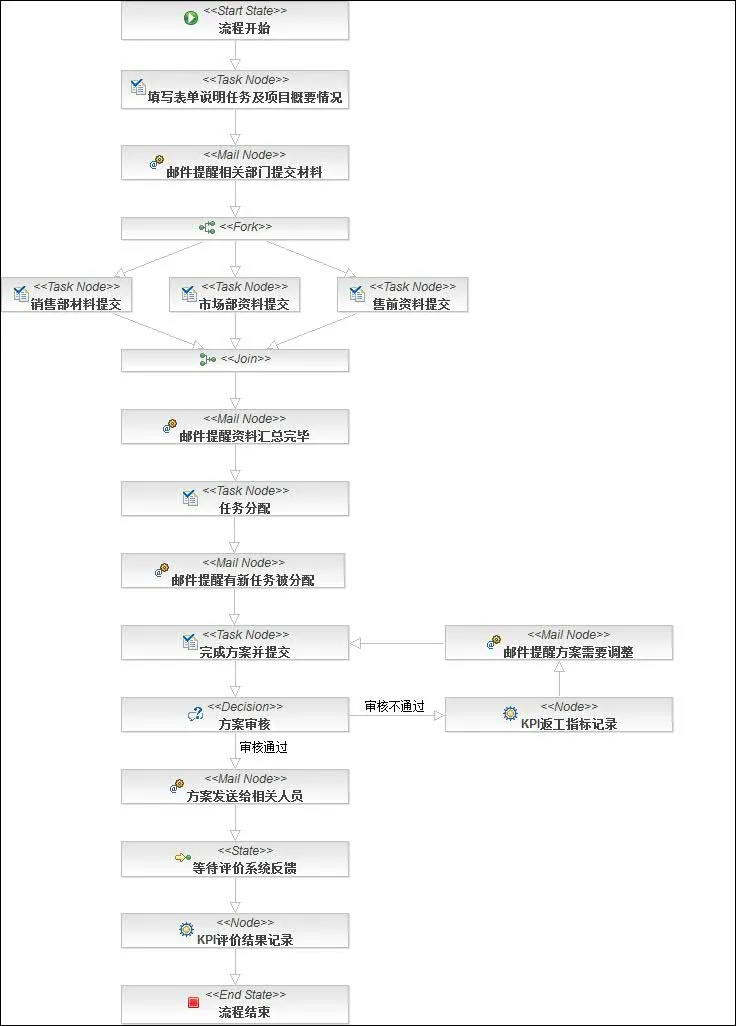
五、构建一个自己的工作流
1、新建一个工作流项目
2、会自动新建一个工作流,打开XXX.jpdl.xml文件,就可以进行编辑了
通过编辑器,自己画一个工作流,会自动生成两个文件,加上刚才的文件一共有三个文件:
XXX.jpdl.xml 节点定义及流程描述
.XXX.gpd.xml 元素的位置信息
XXX.jpg 工作流截图
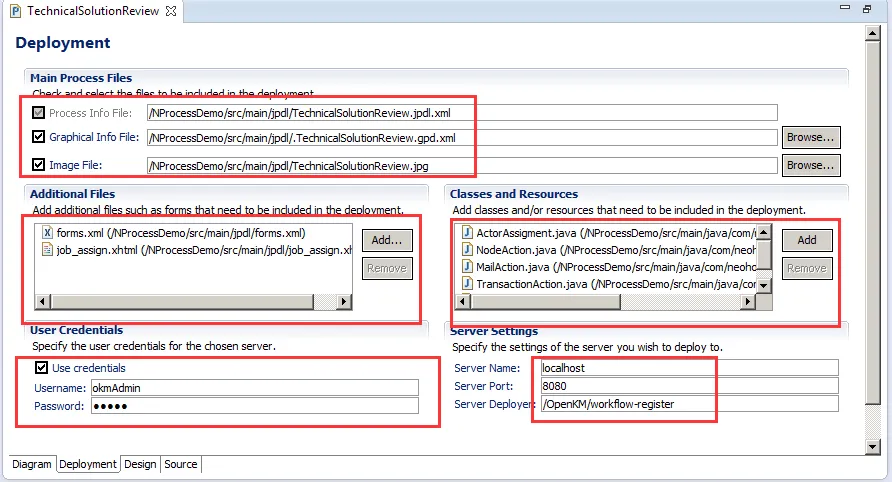
在发布工作流的时候,这三个文件都要带上
六、写Handler
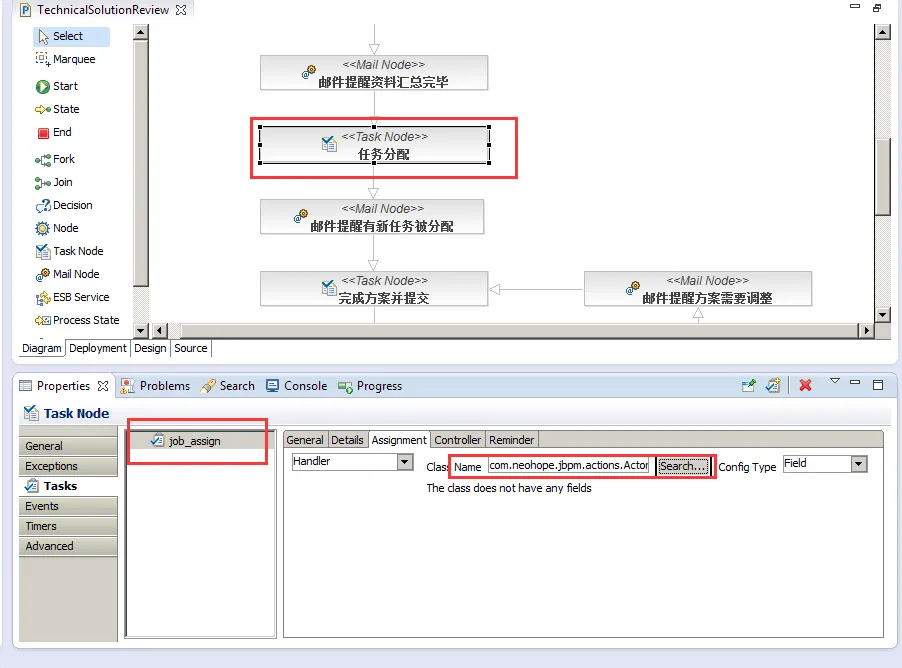
编辑器上,可以直接处理的操作,其实很有限,也没有太多功能,主要还是靠编码实现。
编码的话,主要是实现几类接口:
org.jbpm.graph.def.ActionHandler:
多数的Handler,都用这个即可,包括transition、mail node、task node、node等
org.jbpm.taskmgmt.exe.Assignable:
主要用于任务执行者的分配
org.jbpm.graph.node.DecisionHandler:
主要用于选择节点
Handeler都只需要实现对于的方法即可。最后,通过编辑器进行配置。
六、发布工作流
发布也很简单,就是直接用eclipse上的jbpm菜单就可以发布了,但要把参数配置好才行
七、执行
1、首先要到openkm的后台,将工作流启用
2、然后找到任意一个文件、文件夹,执行工作流即可
八、填坑
遇到的最大的坑,莫过于字符集问题,我这边的方法,只修正了.XXX.gpd.xml的字符集问题,form的字符集问题,并没有修正
找到文件org.jbpm.gd.jpdl_3.4.1.v20120717-1252-H7-GA-SOA.jar,替换掉文件AbstractContentProvider.class即可
AbstractContentProvider.java源码如下:
package org.jbpm.gd.common.editor;

import java.io.ByteArrayInputStream;
import java.io.IOException;
import java.io.InputStreamReader;
import java.io.PrintWriter;
import java.io.StringWriter;
import java.io.UnsupportedEncodingException;
import java.io.Writer;
import java.util.ArrayList;
import java.util.Iterator;
import java.util.List;
import org.dom4j.Document;
import org.dom4j.DocumentException;
import org.dom4j.DocumentHelper;
import org.dom4j.Element;
import org.dom4j.io.OutputFormat;
import org.dom4j.io.SAXReader;
import org.dom4j.io.XMLWriter;
import org.eclipse.core.resources.IFile;
import org.eclipse.core.resources.IProject;
import org.eclipse.core.runtime.CoreException;
import org.eclipse.core.runtime.IPath;
import org.eclipse.draw2d.geometry.Dimension;
import org.eclipse.draw2d.geometry.Point;
import org.eclipse.draw2d.geometry.Rectangle;
import org.eclipse.jface.dialogs.MessageDialog;
import org.eclipse.ui.IEditorInput;
import org.eclipse.ui.IFileEditorInput;
import org.eclipse.ui.part.FileEditorInput;
import org.jbpm.gd.common.model.NamedElement;
import org.jbpm.gd.common.model.SemanticElement;
import org.jbpm.gd.common.notation.AbstractNodeContainer;
import org.jbpm.gd.common.notation.BendPoint;
import org.jbpm.gd.common.notation.Edge;
import org.jbpm.gd.common.notation.Label;
import org.jbpm.gd.common.notation.Node;
import org.jbpm.gd.common.notation.NodeContainer;
import org.jbpm.gd.common.notation.NotationElement;
import org.jbpm.gd.common.notation.NotationElementFactory;
import org.jbpm.gd.common.notation.NotationMapping;
import org.jbpm.gd.common.notation.RootContainer;
import org.jbpm.gd.jpdl.Logger;

public abstract class AbstractContentProvider implements ContentProvider {
	protected abstract SemanticElement getEdgeSemanticElement(Node paramNode,
			Element paramElement, int paramInt);

	protected abstract SemanticElement getNodeSemanticElement(
			NodeContainer paramNodeContainer, Element paramElement, int paramInt);

	protected abstract void addNodes(NodeContainer paramNodeContainer,
			Element paramElement);

	protected abstract void addEdges(Node paramNode, Element paramElement);

	protected abstract SemanticElement findDestination(Edge paramEdge,
			Node paramNode);

	protected String getRootNotationInfoElement() {
		return "<root-container/>";
	}

	protected String createInitialNotationInfo() {
		StringBuffer buffer = new StringBuffer();
		buffer.append("<?xml version=\"1.0\" encoding=\"UTF-8\"?>");
		buffer.append("\n\n");
		buffer.append(getRootNotationInfoElement());
		return buffer.toString();
	}

	public String getNotationInfoFileName(String semanticInfoFileName) {
		return ".gpd." + semanticInfoFileName;
	}

	public String getDiagramImageFileName(String semanticInfoFileName) {
		int index = semanticInfoFileName.indexOf(".xml");
		String result = index > -1 ? semanticInfoFileName.substring(0, index)
				: semanticInfoFileName;
		return result + ".jpg";
	}

	protected void processRootContainer(RootContainer rootContainer,
			Element notationInfo) {
		addDimension(rootContainer, notationInfo);
		addNodes(rootContainer, notationInfo);
		postProcess(rootContainer);
	}

	protected void addNodes(NodeContainer nodeContainer,
			SemanticElement[] semanticElements, Element notationInfo) {
		List notationInfoElements = notationInfo == null ? new ArrayList()
				: notationInfo.elements();
		for (int i = 0; i < semanticElements.length; i++) {
			Element notationInfoElement = null;
			String nodeName = ((NamedElement) semanticElements[i]).getName();
			for (int j = 0; j < notationInfoElements.size(); j++) {
				Element element = (Element) notationInfoElements.get(j);
				String elementName = element.attributeValue("name");
				if (((elementName != null) && (elementName.equals(nodeName)))
						|| ((elementName == null) && (nodeName == null))) {
					notationInfoElement = element;
				}
			}

			addNode(nodeContainer, semanticElements[i], notationInfoElement);
		}
	}

	protected void addEdges(Node node, SemanticElement[] semanticElements,
			Element notationInfo) {
		List notationInfoElements = notationInfo == null ? new ArrayList()
				: notationInfo.elements();
		for (int i = 0; i < semanticElements.length; i++) {
			Element notationInfoElement = null;
			if (notationInfoElements.size() >= i + 1) {
				notationInfoElement = (Element) notationInfoElements.get(i);
			}
			addEdge(node, semanticElements[i], notationInfoElement);
		}
	}

	protected void addNode(NodeContainer nodeContainer,
			SemanticElement semanticElement, Element notationInfoElement) {
		String notationElementId = NotationMapping
				.getNotationElementId(semanticElement.getElementId());
		Node notationElement = (Node) nodeContainer.getFactory().create(
				notationElementId);
		notationElement.setSemanticElement(semanticElement);
		notationElement.register();
		nodeContainer.addNode(notationElement);
		semanticElement.addPropertyChangeListener(notationElement);
		processNode(notationElement, notationInfoElement);
		if ((notationElement instanceof NodeContainer)) {
			addNodes((NodeContainer) notationElement, notationInfoElement);
		}
	}

	protected void addEdge(Node node, SemanticElement semanticElement,
			Element notationInfoElement) {
		NotationElement notationElement = node
				.getRegisteredNotationElementFor(semanticElement);
		if (notationElement == null) {
			String notationElementId = NotationMapping
					.getNotationElementId(semanticElement.getElementId());
			notationElement = node.getFactory().create(notationElementId);
			notationElement.setSemanticElement(semanticElement);
			notationElement.register();
			node.addLeavingEdge((Edge) notationElement);
			semanticElement.addPropertyChangeListener(notationElement);
		}
		processEdge((Edge) notationElement, notationInfoElement);
	}

	protected void addDimension(RootContainer processDefinitionNotationElement,
			Element processDiagramInfo) {
		String width = processDiagramInfo.attributeValue("width");
		String height = processDiagramInfo.attributeValue("height");
		Dimension dimension = new Dimension(width == null ? 0 : Integer
				.valueOf(width).intValue(), height == null ? 0 : Integer
				.valueOf(height).intValue());
		processDefinitionNotationElement.setDimension(dimension);
	}

	protected void processNode(Node node, Element notationInfoElement) {
		addConstraint(node, notationInfoElement);
		addEdges(node, notationInfoElement);
	}

	protected void processEdge(Edge edge, Element edgeInfo) {
		processLabel(edge, edgeInfo);
		addBendpoints(edge, edgeInfo);
	}

	protected void addBendpoints(Edge edge, Element edgeInfo) {
		if (edgeInfo != null) {
			List list = edgeInfo.elements("bendpoint");
			for (int i = 0; i < list.size(); i++) {
				addBendpoint(edge, (Element) list.get(i), i);
			}
		}
	}

	protected BendPoint addBendpoint(Edge edge, Element bendpointInfo, int index) {
		BendPoint result = new BendPoint();
		processBendpoint(result, bendpointInfo);
		edge.addBendPoint(result);
		return result;
	}

	protected void processBendpoint(BendPoint bendPoint, Element bendpointInfo) {
		int w1 = Integer.valueOf(bendpointInfo.attributeValue("w1")).intValue();
		int h1 = Integer.valueOf(bendpointInfo.attributeValue("h1")).intValue();
		int w2 = Integer.valueOf(bendpointInfo.attributeValue("w2")).intValue();
		int h2 = Integer.valueOf(bendpointInfo.attributeValue("h2")).intValue();
		Dimension d1 = new Dimension(w1, h1);
		Dimension d2 = new Dimension(w2, h2);
		bendPoint.setRelativeDimensions(d1, d2);
	}

	private void processLabel(Edge edge, Element edgeInfo) {
		Element label = null;
		if (edgeInfo != null) {
			label = edgeInfo.element("label");
		}
		if (label != null) {
			Point offset = new Point();
			offset.x = Integer.valueOf(label.attributeValue("x")).intValue();
			offset.y = Integer.valueOf(label.attributeValue("y")).intValue();
			edge.getLabel().setOffset(offset);
		}
	}

	private void addConstraint(Node node, Element nodeInfo) {
		Rectangle constraint = node.getConstraint().getCopy();
		Dimension initialDimension = NotationMapping.getInitialDimension(node
				.getSemanticElement().getElementId());
		if (initialDimension != null) {
			constraint.setSize(initialDimension);
		}
		if (nodeInfo != null) {
			constraint.x = Integer.valueOf(nodeInfo.attributeValue("x"))
					.intValue();
			constraint.y = Integer.valueOf(nodeInfo.attributeValue("y"))
					.intValue();
			constraint.width = Integer
					.valueOf(nodeInfo.attributeValue("width")).intValue();
			constraint.height = Integer.valueOf(
					nodeInfo.attributeValue("height")).intValue();
		}
		node.setConstraint(constraint);
	}

	protected void postProcess(NodeContainer nodeContainer) {
		List nodes = nodeContainer.getNodes();
		for (int i = 0; i < nodes.size(); i++) {
			Node node = (Node) nodes.get(i);
			List edges = node.getLeavingEdges();
			for (int j = 0; j < edges.size(); j++) {
				Edge edge = (Edge) edges.get(j);
				SemanticElement destination = findDestination(edge, node);
				Node target = (Node) edge.getFactory()
						.getRegisteredNotationElementFor(destination);
				if ((target != null) && (edge.getTarget() == null)) {
					target.addArrivingEdge(edge);
				}
			}
			if ((node instanceof NodeContainer)) {
				postProcess((NodeContainer) node);
			}
		}
	}

	public boolean saveToInput(IEditorInput input, RootContainer rootContainer) {
		boolean result = true;
		try {
			IFile file = getNotationInfoFile(((IFileEditorInput) input)
					.getFile());
			InputStreamReader reader = new InputStreamReader(file.getContents(), "UTF-8");
			Element notationInfo = new SAXReader().read(reader)
					.getRootElement();
			if (upToDateCheck(notationInfo)) {
				getNotationInfoFile(((IFileEditorInput) input).getFile())
						.setContents(
								new ByteArrayInputStream(toNotationInfoXml(
										rootContainer).getBytes("UTF-8")),
								true, true, null);
			} else {
				result = false;
			}
		} catch (Exception e) {
			e.printStackTrace();
		}
		return result;
	}

	protected String toNotationInfoXml(RootContainer rootContainer) {
		StringWriter writer = new StringWriter();
		write(rootContainer, writer);
		return writer.toString();
	}

	protected void write(RootContainer rootContainer, Writer writer) {
		try {
			Document document = DocumentHelper.createDocument();
			Element root = document.addElement("root-container");
			write(rootContainer, root);
			XMLWriter xmlWriter = new XMLWriter(writer,
					OutputFormat.createPrettyPrint());
			xmlWriter.write(document);
		} catch (IOException e) {
			e.printStackTrace(new PrintWriter(writer));
		}
	}

	protected void write(RootContainer rootContainer, Element element) {
		addAttribute(element, "name",
				((NamedElement) rootContainer.getSemanticElement()).getName());
		addAttribute(element, "width",
				Integer.toString(rootContainer.getDimension().width));
		addAttribute(element, "height",
				Integer.toString(rootContainer.getDimension().height));
		Iterator iter = rootContainer.getNodes().iterator();
		while (iter.hasNext()) {
			write((Node) iter.next(), element);
		}
	}

	protected void write(Node node, Element element) {
		Element newElement = null;
		if ((node instanceof AbstractNodeContainer)) {
			newElement = addElement(element, "node-container");
		} else {
			newElement = addElement(element, "node");
		}
		addAttribute(newElement, "name",
				((NamedElement) node.getSemanticElement()).getName());
		addAttribute(newElement, "x", String.valueOf(node.getConstraint().x));
		addAttribute(newElement, "y", String.valueOf(node.getConstraint().y));
		addAttribute(newElement, "width",
				String.valueOf(node.getConstraint().width));
		addAttribute(newElement, "height",
				String.valueOf(node.getConstraint().height));
		if ((node instanceof AbstractNodeContainer)) {
			Iterator nodes = ((AbstractNodeContainer) node).getNodes()
					.iterator();
			while (nodes.hasNext()) {
				write((Node) nodes.next(), newElement);
			}
		}
		Iterator edges = node.getLeavingEdges().iterator();
		while (edges.hasNext()) {
			Edge edge = (Edge) edges.next();
			write(edge, addElement(newElement, "edge"));
		}
	}

	protected void write(Edge edge, Element element) {
		Point offset = edge.getLabel().getOffset();
		if (offset != null) {
			Element label = addElement(element, "label");
			addAttribute(label, "x", String.valueOf(offset.x));
			addAttribute(label, "y", String.valueOf(offset.y));
		}
		Iterator bendpoints = edge.getBendPoints().iterator();
		while (bendpoints.hasNext()) {
			write((BendPoint) bendpoints.next(),
					addElement(element, "bendpoint"));
		}
	}

	protected void write(BendPoint bendpoint, Element bendpointElement) {
		addAttribute(bendpointElement, "w1",
				String.valueOf(bendpoint.getFirstRelativeDimension().width));
		addAttribute(bendpointElement, "h1",
				String.valueOf(bendpoint.getFirstRelativeDimension().height));
		addAttribute(bendpointElement, "w2",
				String.valueOf(bendpoint.getSecondRelativeDimension().width));
		addAttribute(bendpointElement, "h2",
				String.valueOf(bendpoint.getSecondRelativeDimension().height));
	}

	protected Element addElement(Element element, String elementName) {
		Element newElement = element.addElement(elementName);
		return newElement;
	}

	protected void addAttribute(Element e, String attributeName, String value) {
		if (value != null) {
			e.addAttribute(attributeName, value);
		}
	}

	private void createNotationInfoFile(IFile notationInfoFile) {
		try {
			notationInfoFile.create(new ByteArrayInputStream(
					createInitialNotationInfo().toString().getBytes("UTF-8")),
					true, null);
		} catch (CoreException e) {
			Logger.logError(e);
		} catch (UnsupportedEncodingException e) {
			Logger.logError(e);
		}
	}

	protected IFile getNotationInfoFile(IFile semanticInfoFile) {
		IProject project = semanticInfoFile.getProject();
		IPath semanticInfoPath = semanticInfoFile.getProjectRelativePath();
		IPath notationInfoPath = semanticInfoPath.removeLastSegments(1).append(
				getNotationInfoFileName(semanticInfoFile.getName()));
		IFile notationInfoFile = project.getFile(notationInfoPath);
		if (!notationInfoFile.exists()) {
			createNotationInfoFile(notationInfoFile);
		}
		return notationInfoFile;
	}

	public void addNotationInfo(RootContainer rootContainer, IEditorInput input) {
		try {
			IFile file = getNotationInfoFile(((FileEditorInput) input)
					.getFile());
			if (file.exists()) {
				InputStreamReader reader = new InputStreamReader(
						file.getContents(),"UTF-8");
				Element notationInfo = new SAXReader().read(reader)
						.getRootElement();
				boolean changed = convertCheck(notationInfo);
				processRootContainer(rootContainer, notationInfo);
				if (changed) {
					file.setContents(
							new ByteArrayInputStream(toNotationInfoXml(
									rootContainer).getBytes("UTF-8")), true,
							true, null);
				}
			} else {
				file.create(new ByteArrayInputStream(
						createInitialNotationInfo().toString()
								.getBytes("UTF-8")), true, null);
			}
		} catch (DocumentException e) {
			e.printStackTrace();
			throw new RuntimeException(e);
		} catch (CoreException e) {
			e.printStackTrace();
			throw new RuntimeException(e);
		} catch (UnsupportedEncodingException e) {
			e.printStackTrace();
			throw new RuntimeException(e);
		}
	}

	private boolean convertCheck(Element notationInfo) {
		boolean changed = false;
		if (("process-diagram".equals(notationInfo.getName()))
				|| ("pageflow-diagram".equals(notationInfo.getName()))) {
			MessageDialog dialog = new MessageDialog(
					null,
					"Convert To 3.1.x Format",
					null,
					"A file created with an older GPD version was detected. If you open this file it will be converted to the 3.1.x format and overwritten.\nDo you want to continue?",
					3, new String[] { "Convert And Open",
							"Continue Without Converting" }, 0);
			if (dialog.open() == 0) {
				convertToRootContainer(notationInfo);
				changed = true;
			}
		}
		return changed;
	}

	private boolean upToDateCheck(Element notationInfo) {
		if (("process-diagram".equals(notationInfo.getName()))
				|| ("pageflow-diagram".equals(notationInfo.getName()))) {
			MessageDialog dialog = new MessageDialog(
					null,
					"GPD 3.0.x Format Detected",
					null,
					"The file you are trying to save contains GPD 3.0.x information.Saving the file will result in an automatic conversion into the 3.1.x format.It will be impossible to open it with the old GPD.\nDo you want to continue?",
					3, new String[] { "Save And Convert", "Cancel" }, 0);
			return dialog.open() == 0;
		}
		return true;
	}

	private void convertToRootContainer(Element notationInfo) {
		notationInfo.setName("root-container");
		convertChildrenToEdge(notationInfo);
	}

	private void convertChildrenToEdge(Element element) {
		List list = element.elements();
		for (int i = 0; i < list.size(); i++) {
			convertToEdge((Element) list.get(i));
		}
	}

	private void convertToEdge(Element element) {
		if ("transition".equals(element.getName())) {
			element.setName("edge");
		}
		convertChildrenToEdge(element);
	}
}
结语:
1、jbpm如果要用起来,还是要有很大的工作量的,而且早期版本对中文支持并不友好
2、openkm的工作流,整体来说太弱了,不够假单和直观
3、这种流程式管理方式,并不符合我们的管理方式
4、先用openkm的文档管理功能就好了
5、如果openkm再不升级框架,估计后面我们要找其他文档管理工具了。
随着需要管理服务的增多,如何编排服务,成了一个很迫切的问题。本文就介绍几种常见的微服务编排方式:
1、Orchestration
这种方式,和BPM、ESB的思想很相似,实现方案多是同步的。
首先要有一个流程控制服务,该服务接收请求,依照业务逻辑规则,依次调用各个微服务,并最终完成处理逻辑。
这种方法的好处是,流程控制服务时时刻刻都知道每一笔业务究竟进行到了什么地步,监控业务成了相对简单的事情。
这种方法的坏处是,流程控制服务很容易控制了太多的业务逻辑,耦合度过高,变得臃肿,而各个微服务退化为单纯的增删改查,容易失去自身价值。
为了便于理解,您可以把控制服务看作BPM、ESB引擎,微服务为BPM、ESB的各种组件。
2、Choreography
这种方式,可以看作一种消息驱动模式,或者说是订阅发布模式,实现方案多是异步的。
每笔业务到来后,各个监听改事件的服务,会主动获取消息,处理,并可以按需发布自己的消息。
这种方法的好处是,耦合度低,每个服务都可以各司其职。
这种方法的坏处是,业务流程是通过订阅的方式来体现的,很难直接监控每笔业务的处理,因此需要增加相应的监控系统,来保证业务顺畅进行。
为了便于理解,您可以把不同队列看作不同种类的消息,微服务看作消息处理函数。
3、API网关
API网关,可以看作一种简单的接口聚合/拆分的方式。
每笔业务到来后,先到达网关,网关调用各微服务,并最终聚合/拆分需反馈的结果。
这种方法的好处是,对外接口相对稳定,可以利用LAN的带宽,弥补因特网的不足。
这种方法的坏处是,只适合业务逻辑较为简单的场景,业务逻辑过于复杂时,网关接口耦合度及复杂度会急剧升高,变得臃肿。
其实就是一个适配网关,比如对于Web端,可以一个页面同时发起几十个请求,而对于移动端,最好是一个页面就几个请求
。而采用API网关,后面的微服务可以是相同的。
远程调用COM+时经常会遇到下面的错误:
Error: 70
Description: Permission denied
这时就要进行授权(这个方法只能调通Win7与Win7,无法调通Win7与XP)。
首先是服务端配置:
1、首先在COM+服务端新建一个用户,比如COMPTEST,用户一定要加入组Distributed COM Users。(XP没有这个组,我用了Administrator权限依然不可以。。。)
2、在COM+服务端运行
#32位系统32位COM,64位系统64位COM
dcomcnfg
#64位系统32位COM
comexp.msc -32
3、在“服务组件-》计算机-》我的电脑”右键,属性
默认属性-》确认DCOM服务开启
4、在“服务组件-》计算机-》我的电脑-》COM+应用程序”,对应的COM+应用程序上,右键,属性
安全性-》授权,取消勾选
安全性-》安全性级别,改为Process
安全性-》将身份验证级别修改为无
安全性-》将模拟级别改为匿名
激活-》激活类型改为应用程序
5、在在“服务组件-》计算机-》我的电脑-》COM+应用程序-》对应COM+应用程序-》组件”,对应的COM+组件上,右键,属性
安全性-》授权,取消勾选
然后是客户端配置
1、在客户端,添加服务端的COMPTEST用户凭证
搞定!
PS:如果还不行的话,再设置下面的内容
1、在“服务组件-》计算机-》我的电脑”右键,属性
默认属性-》将默认身份验证基本修改为无
默认属性-》将默认模拟级别改为匿名
COM安全-》访问权限,添加Everyone及匿名用户
COM安全-》启动与激活权限,添加Everyone及匿名用户
2、然后要修改一下本地安全策略,让匿名用户与Everyone权限相同
3、然后修改本地安全策略,让DCOM可以Everyone操作
本篇文章介绍了如何写一个简单的COM+客户端(CSharp)。
1、首先要导入COM组件编译时生成的TBL文件(ATL),并引用COM组件的Assembly(CS)
2、代码如下
using System;
using System.Collections.Generic;
using System.Linq;
using System.Text;
using ATLCOMPLib;
using CSDll;

namespace CSTestComp
{
    class Program
    {
        static void Main(string[] args)
        {
            try
            {
                testATL();
                //testCS();
            }
            catch (Exception ex)
            {
                Console.WriteLine(ex.Message);
            }

            Console.ReadKey();
        }

        static void testATL()
        {
            Type justATestCOMPType = System.Type.GetTypeFromProgID("ATLCOMP.JustATestCOMP", "172.16.172.3");
            IJustATestCOMP svc = (IJustATestCOMP)System.Activator.CreateInstance(justATestCOMPType);
            int c = svc.Add(1, 2);
            System.Console.WriteLine(c);
            String retValue = svc.SayHiTo("com+");
            System.Console.WriteLine(retValue);
            System.Console.Read();
        }

        static void testCS()
        {
            Type justATestCSSvcType = System.Type.GetTypeFromProgID("CSDll.JustATestCSSvc", "172.16.172.3");
            IJustATestCSSvc svc = (IJustATestCSSvc)System.Activator.CreateInstance(justATestCSSvcType);
            int c = svc.Add(1, 2);
            System.Console.WriteLine(c);
            String retValue = svc.SayHiTo("com+");
            System.Console.WriteLine(retValue);
            System.Console.Read();
        }
    }
}
如果是本机测试(带IP),一般不会遇到权限问题
PS:
用了一晚上时间,只能调通Win7与Win7之间远程调用,无法调通Win7与XP之间远程调用(总是各种提示Access is Denied)。
如果有谁调通过,麻烦留言告诉我一下。谢谢!