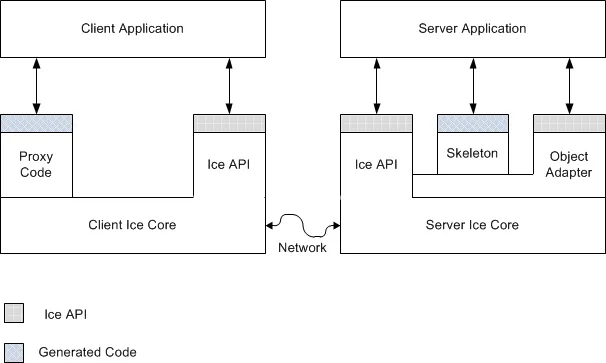
下面的Java代码,演示了三种常用的Memcached常用驱动的连接方式,所有驱动现在都托管在GitHub上面,大家可以自行查找。
Memcached常用操作
*生产环境建议直接用linux
1、命令行直接运行
1.1、可以直接指定参数运行
#最大16M内存,监听11211端口,最大连接数8 memcached.exe -m 16 -p 11211 -c 8
1.2、可以注册为Windows服务,再运行
#注册为服务 memcached.exe -d install #开启服务 memcached.exe -d start #关闭服务 memcached.exe -d stop #卸载服务 memcached.exe -d uninstall
DBUS发送接收数据(下)
1、编译后,由于没有进行配置,默认是无法运行的。
为了可以正常运行,增加或修改下面的配置文件即可。
/etc/dbus-1.0/system-local.conf
<!-- This configuration file controls the systemwide message bus.
Add a system-local.conf and edit that rather than changing this
file directly. -->
<!-- Note that there are any number of ways you can hose yourself
security-wise by screwing up this file; in particular, you
probably don't want to listen on any more addresses, add any more
auth mechanisms, run as a different user, etc. -->
<!DOCTYPE busconfig PUBLIC "-//freedesktop//DTD D-Bus Bus Configuration 1.0//EN"
"http://www.freedesktop.org/standards/dbus/1.0/busconfig.dtd">
<busconfig>
<!-- Our well-known bus type, do not change this -->
<type>system</type>
<!-- Run as special user -->
<user>messagebus</user>
<!-- Fork into daemon mode -->
<fork/>
<!-- We use system service launching using a helper -->
<standard_system_servicedirs/>
<!-- This is a setuid helper that is used to launch system services -->
<servicehelper>/usr/lib/dbus-1.0/dbus-daemon-launch-helper</servicehelper>
<!-- Write a pid file -->
<pidfile>/var/run/dbus/pid</pidfile>
<!-- Enable logging to syslog -->
<syslog/>
<!-- Only allow socket-credentials-based authentication -->
<auth>EXTERNAL</auth>
<!-- Only listen on a local socket. (abstract=/path/to/socket
means use abstract namespace, don't really create filesystem
file; only Linux supports this. Use path=/whatever on other
systems.) -->
<listen>unix:path=/var/run/dbus/system_bus_socket</listen>
<policy context="default">
<!-- All users can connect to system bus -->
<allow user="*"/>
<!-- Holes must be punched in service configuration files for
name ownership and sending method calls -->
<allow own="*"/>
<allow send_type="method_call"/>
<!-- Signals and reply messages (method returns, errors) are allowed
by default -->
<allow send_type="signal"/>
<allow send_requested_reply="true" send_type="method_return"/>
<allow send_requested_reply="true" send_type="error"/>
<!-- All messages may be received by default -->
<allow receive_type="method_call"/>
<allow receive_type="method_return"/>
<allow receive_type="error"/>
<allow receive_type="signal"/>
<!-- Allow anyone to talk to the message bus -->
<allow send_destination="org.freedesktop.DBus"/>
<!-- But disallow some specific bus services -->
<deny send_destination="org.freedesktop.DBus"
send_interface="org.freedesktop.DBus"
send_member="UpdateActivationEnvironment"/>
<deny send_destination="org.freedesktop.DBus"
send_interface="org.freedesktop.systemd1.Activator"/>
</policy>
<!-- Only systemd, which runs as root, may report activation failures. -->
<policy user="root">
<allow send_destination="org.freedesktop.DBus"
send_interface="org.freedesktop.systemd1.Activator"/>
</policy>
<!-- Config files are placed here that among other things, punch
holes in the above policy for specific services. -->
<includedir>system.d</includedir>
<include if_selinux_enabled="yes" selinux_root_relative="yes">contexts/dbus_contexts</include>
</busconfig>
2、测试消息发送
服务端:
$./testdbus_s.bin receive Listening for signals Match rule sent Got Signal with value: Hello Got Signal with value: Hi Bye......
客户端:
$./testdbus_s.bin send Hello Sending signal with value: Hello Signal Sent $./testdbus_s.bin send Hi Sending signal with value: Hi Signal Sent $./testdbus_s.bin send Bye Sending signal with value: Bye Signal Sent
3、测试方法调用
服务端:
$./testdbus_s.bin listen Listening for method calls Method Invoked with value: Hello Method Invoked with value: Hi Bye......
客户端:
$./testdbus_s.bin query Hello Calling remote method with Hello Request Sent Got Reply: 1, 21614 $./testdbus_s.bin query Hi Calling remote method with Hi Request Sent Got Reply: 1, 21614 $./testdbus_s.bin query Bye Calling remote method with Bye Request Sent Got Reply: 1, 21614
DBUS发送接收数据(上)
1、Server端
testdbus_s.c
#define DBUS_API_SUBJECT_TO_CHANGE
#include <dbus/dbus.h>
#include <stdbool.h>
#include <unistd.h>
#include <stdio.h>
#include <stdlib.h>
/**
* Wait for signals on the bus and reply
*/
void receive()
{
DBusMessage* msg;
DBusMessageIter args;
DBusConnection* conn;
DBusError err;
int ret;
char* sigvalue;
int loop=1;
printf("Listening for signals\n");
// initialise the errors
dbus_error_init(&err);
// connect to the bus and check for errors
conn = dbus_bus_get(DBUS_BUS_SYSTEM, &err);
if (dbus_error_is_set(&err)) {
fprintf(stderr, "Connection Error (%s)\n", err.message);
dbus_error_free(&err);
}
if (NULL == conn) {
exit(1);
}
// request our name on the bus and check for errors
ret = dbus_bus_request_name(conn, "neohope.dbus.signal.target", DBUS_NAME_FLAG_REPLACE_EXISTING , &err);
if (dbus_error_is_set(&err)) {
fprintf(stderr, "Name Error (%s)\n", err.message);
dbus_error_free(&err);
}
if (DBUS_REQUEST_NAME_REPLY_PRIMARY_OWNER != ret) {
exit(1);
}
// add a rule for which messages we want to see
dbus_bus_add_match(conn, "type='signal',interface='neohope.dbus.signal.Type'", &err); // see signals from the given interface
dbus_connection_flush(conn);
if (dbus_error_is_set(&err)) {
fprintf(stderr, "Match Error (%s)\n", err.message);
exit(1);
}
printf("Match rule sent\n");
// loop listening for signals being emmitted
while (loop) {
// non blocking read of the next available message
dbus_connection_read_write(conn, 0);
msg = dbus_connection_pop_message(conn);
// loop again if we haven't read a message
if (NULL == msg) {
sleep(1);
continue;
}
// check if the message is a signal from the correct interface and with the correct name
if (dbus_message_is_signal(msg, "neohope.dbus.signal.Type", "TestSignal")) {
// read the parameters
if (!dbus_message_iter_init(msg, &args))
fprintf(stderr, "Message Has No Parameters\n");
else if (DBUS_TYPE_STRING != dbus_message_iter_get_arg_type(&args))
fprintf(stderr, "Argument is not string!\n");
else
dbus_message_iter_get_basic(&args, &sigvalue);
if(strcmp("Bye",sigvalue)==0) {
loop = 0;
printf("Bye......\n");
}
else {
printf("Got Signal with value: %s\n", sigvalue);
}
}
// free the message
dbus_message_unref(msg);
}
// do not close the connection
// dbus_connection_close(conn);
}
/**
* Deal with remote method call
*/
int reply_to_method_call(DBusMessage* msg, DBusConnection* conn)
{
DBusMessage* reply;
DBusMessageIter args;
int stat = 1;
int ret = 1;
dbus_uint32_t level = 21614;
dbus_uint32_t serial = 0;
char* param = "";
// read the arguments
if (!dbus_message_iter_init(msg, &args))
fprintf(stderr, "Message has no arguments!\n");
else if (DBUS_TYPE_STRING != dbus_message_iter_get_arg_type(&args))
fprintf(stderr, "Argument is not string!\n");
else
dbus_message_iter_get_basic(&args, ¶m);
if(strcmp("Bye",param)==0){
ret = 0;
printf ("Bye......\n");
}
else {
printf("Method Invoked with value: %s\n", sigvalue);
}
// create a reply from the message
reply = dbus_message_new_method_return(msg);
// add the arguments to the reply
dbus_message_iter_init_append(reply, &args);
if (!dbus_message_iter_append_basic(&args, DBUS_TYPE_BOOLEAN, &stat)) {
fprintf(stderr, "Out Of Memory!\n");
exit(1);
}
if (!dbus_message_iter_append_basic(&args, DBUS_TYPE_UINT32, &level)) {
fprintf(stderr, "Out Of Memory!\n");
exit(1);
}
// send the reply && flush the connection
if (!dbus_connection_send(conn, reply, &serial)) {
fprintf(stderr, "Out Of Memory!\n");
exit(1);
}
dbus_connection_flush(conn);
// free the reply
dbus_message_unref(reply);
return ret;
}
/**
* Server that exposes a method call and waits for it to be called
*/
void listen()
{
DBusMessage* msg;
DBusMessage* reply;
DBusMessageIter args;
DBusConnection* conn;
DBusError err;
int loop = 1;
int ret;
char* param;
printf("Listening for method calls\n");
// initialise the error
dbus_error_init(&err);
// connect to the bus and check for errors
conn = dbus_bus_get(DBUS_BUS_SYSTEM, &err);
if (dbus_error_is_set(&err)) {
fprintf(stderr, "Connection Error (%s)\n", err.message);
dbus_error_free(&err);
}
if (NULL == conn) {
fprintf(stderr, "Connection Null\n");
exit(1);
}
// request our name on the bus and check for errors
ret = dbus_bus_request_name(conn, "neohope.dbus.method.provider", DBUS_NAME_FLAG_REPLACE_EXISTING , &err);
if (dbus_error_is_set(&err)) {
fprintf(stderr, "Name Error (%s)\n", err.message);
dbus_error_free(&err);
}
if (DBUS_REQUEST_NAME_REPLY_PRIMARY_OWNER != ret) {
fprintf(stderr, "Not Primary Owner (%d)\n", ret);
exit(1);
}
// loop, testing for new messages
while (loop) {
// non blocking read of the next available message
dbus_connection_read_write(conn, 0);
msg = dbus_connection_pop_message(conn);
// loop again if we haven't got a message
if (NULL == msg) {
sleep(1);
continue;
}
// check this is a method call for the right interface & method
if (dbus_message_is_method_call(msg, "neohope.dbus.method.Type", "TestMethod"))
loop = reply_to_method_call(msg, conn);
// free the message
dbus_message_unref(msg);
}
// do not close the connection
// dbus_connection_close(conn);
}
int main(int argc, char** argv)
{
if (2 > argc) {
printf ("Syntax: testdbus_s [receive|listen] [<param>]\n");
return 1;
}
char* param = "no param";
if (3 >= argc && NULL != argv[2]) param = argv[2];
if (0 == strcmp(argv[1], "receive"))
receive();
else if (0 == strcmp(argv[1], "listen"))
listen();
else {
printf ("Syntax: testdbus_s [receive|listen] [<param>]\n");
return 1;
}
return 0;
}
2、Client端
testdbus_c.c
#define DBUS_API_SUBJECT_TO_CHANGE
#include <dbus/dbus.h>
#include <stdbool.h>
#include <unistd.h>
#include <stdio.h>
#include <stdlib.h>
/**
* Connect to the DBUS bus and send a broadcast signal
*/
void sendsignal(char* sigvalue)
{
DBusMessage* msg;
DBusMessageIter args;
DBusConnection* conn;
DBusError err;
int ret;
dbus_uint32_t serial = 0;
printf("Sending signal with value: %s\n", sigvalue);
// initialise the error value
dbus_error_init(&err);
// connect to the DBUS system bus, and check for errors
conn = dbus_bus_get(DBUS_BUS_SYSTEM, &err);
if (dbus_error_is_set(&err)) {
fprintf(stderr, "Connection Error (%s)\n", err.message);
dbus_error_free(&err);
}
if (NULL == conn) {
exit(1);
}
// register our name on the bus, and check for errors
ret = dbus_bus_request_name(conn, "neohope.dbus.signal.source", DBUS_NAME_FLAG_REPLACE_EXISTING , &err);
if (dbus_error_is_set(&err)) {
fprintf(stderr, "Name Error (%s)\n", err.message);
dbus_error_free(&err);
}
if (DBUS_REQUEST_NAME_REPLY_PRIMARY_OWNER != ret) {
exit(1);
}
// create a signal & check for errors
msg = dbus_message_new_signal("/neohope/dbus/signal/Object", // object name of the signal
"neohope.dbus.signal.Type", // interface name of the signal
"TestSignal"); // name of the signal
if (NULL == msg)
{
fprintf(stderr, "Message Null\n");
exit(1);
}
// append arguments onto signal
dbus_message_iter_init_append(msg, &args);
if (!dbus_message_iter_append_basic(&args, DBUS_TYPE_STRING, &sigvalue)) {
fprintf(stderr, "Out Of Memory!\n");
exit(1);
}
// send the message and flush the connection
if (!dbus_connection_send(conn, msg, &serial)) {
fprintf(stderr, "Out Of Memory!\n");
exit(1);
}
dbus_connection_flush(conn);
printf("Signal Sent\n");
// free the message
dbus_message_unref(msg);
// do not close the connection
// dbus_connection_close(conn);
}
/**
* Call a method on a remote object
*/
void query(char* param)
{
DBusMessage* msg;
DBusMessageIter args;
DBusConnection* conn;
DBusError err;
DBusPendingCall* pending;
int ret;
int stat;
dbus_uint32_t level;
printf("Calling remote method with %s\n", param);
// initialiset the errors
dbus_error_init(&err);
// connect to the system bus and check for errors
conn = dbus_bus_get(DBUS_BUS_SYSTEM, &err);
if (dbus_error_is_set(&err)) {
fprintf(stderr, "Connection Error (%s)\n", err.message);
dbus_error_free(&err);
}
if (NULL == conn) {
exit(1);
}
// request our name on the bus
ret = dbus_bus_request_name(conn, "neohope.dbus.method.caller", DBUS_NAME_FLAG_REPLACE_EXISTING , &err);
if (dbus_error_is_set(&err)) {
fprintf(stderr, "Name Error (%s)\n", err.message);
dbus_error_free(&err);
}
if (DBUS_REQUEST_NAME_REPLY_PRIMARY_OWNER != ret) {
exit(1);
}
// create a new method call and check for errors
msg = dbus_message_new_method_call("neohope.dbus.method.provider", // target for the method call
"/neohope/dbus/method/Object", // object to call on
"neohope.dbus.method.Type", // interface to call on
"TestMethod"); // method name
if (NULL == msg) {
fprintf(stderr, "Message Null\n");
exit(1);
}
// append arguments
dbus_message_iter_init_append(msg, &args);
if (!dbus_message_iter_append_basic(&args, DBUS_TYPE_STRING, ¶m)) {
fprintf(stderr, "Out Of Memory!\n");
exit(1);
}
// send message and get a handle for a reply
if (!dbus_connection_send_with_reply (conn, msg, &pending, -1)) { // -1 is default timeout
fprintf(stderr, "Out Of Memory!\n");
exit(1);
}
if (NULL == pending) {
fprintf(stderr, "Pending Call Null\n");
exit(1);
}
dbus_connection_flush(conn);
printf("Request Sent\n");
// free message
dbus_message_unref(msg);
// block until we recieve a reply
dbus_pending_call_block(pending);
// get the reply message
msg = dbus_pending_call_steal_reply(pending);
if (NULL == msg) {
fprintf(stderr, "Reply Null\n");
exit(1);
}
// free the pending message handle
dbus_pending_call_unref(pending);
// read the parameters
if (!dbus_message_iter_init(msg, &args))
fprintf(stderr, "Message has no arguments!\n");
else if (DBUS_TYPE_BOOLEAN != dbus_message_iter_get_arg_type(&args))
fprintf(stderr, "Argument is not boolean!\n");
else
dbus_message_iter_get_basic(&args, &stat);
if (!dbus_message_iter_next(&args))
fprintf(stderr, "Message has too few arguments!\n");
else if (DBUS_TYPE_UINT32 != dbus_message_iter_get_arg_type(&args))
fprintf(stderr, "Argument is not int!\n");
else
dbus_message_iter_get_basic(&args, &level);
printf("Got Reply: %d, %d\n", stat, level);
// free reply and close connection
dbus_message_unref(msg);
//dbus_connection_close(conn);
}
int main(int argc, char** argv)
{
if (2 > argc) {
printf ("Syntax: testdbus_c [send|query] [<param>]\n");
return 1;
}
char* param = "no param";
if (3 >= argc && NULL != argv[2]) param = argv[2];
if (0 == strcmp(argv[1], "send"))
sendsignal(param);
else if (0 == strcmp(argv[1], "query"))
query(param);
else {
printf ("Syntax: testdbus_c [send|query] [<param>]\n");
return 1;
}
return 0;
}
3、Makefile
CC=gcc LDFLAGS+=-ldbus-1 CFLAGS+=-I/usr/include/dbus-1.0 -I/usr/lib/x86_64-linux-gnu/dbus-1.0/include/ all:testdbus_c.bin testdbus_s.bin testdbus_c.bin:testdbus_c.o $(CC) $(LDFLAGS) -o testdbus_c.bin testdbus_c.o testdbus_c.o:testdbus_c.c $(CC) $(CFLAGS) -c -o testdbus_c.o testdbus_c.c testdbus_s.bin:testdbus_s.o $(CC) $(LDFLAGS) -o testdbus_s.bin testdbus_s.o testdbus_s.o:testdbus_s.c $(CC) $(CFLAGS) -c -o testdbus_s.o testdbus_s.c clean: rm *.o *.bin
4、编译
make
从Scratch开始建立Docker镜像(二)
首先,还是说明一下,正确的做法是使用工具直接生成你需要的镜像,尽量不要自己折腾。
但我是手工处理的,为了就是折腾。
第二部分的目标,就是在neodeb01的基础上,实现Linux的常用网络功能。
1、新建文件夹neodeb02,把你想放到Docker中的文件放到这个目录下面,比如,我这边结构如下:
├── bin
│ ├── dnsdomainname
│ ├── domainname
│ ├── ip
│ ├── netstat
│ ├── ping
│ └── ping6
├── build.sh
├── Dockerfile
├── etc
│ ├── hosts
│ ├── network
│ │ └── interfaces
│ ├── resolvconf
│ │ └── update-libc.d
│ │ └── avahi-daemon
│ └── resolv.conf
├── lib
│ ├── libip4tc.so.0
│ ├── libip4tc.so.0.1.0
│ ├── libip6tc.so.0
│ ├── libip6tc.so.0.1.0
│ ├── libxtables.so.10
│ ├── libxtables.so.10.0.0
│ └── x86_64-linux-gnu
│ ├── libcom_err.so.2
│ ├── libcom_err.so.2.1
│ ├── libdns-export.so.100
│ ├── libgcc_s.so.1
│ ├── libgnutls-deb0.so.28
│ ├── libgnutls-deb0.so.28.41.0
│ ├── libirs-export.so.91
│ ├── libirs-export.so.91.0.0
│ ├── libisccfg-export.so.90
│ ├── libisccfg-export.so.90.1.0
│ ├── libisc-export.so.95
│ ├── libisc-export.so.95.5.0
│ ├── libkeyutils.so.1
│ ├── libkeyutils.so.1.5
│ ├── liblzma.so.5
│ ├── liblzma.so.5.0.0
│ ├── libnss_dns-2.19.so
│ ├── libnss_dns.so.2
│ ├── libresolv-2.19.so
│ └── libresolv.so.2
├── sbin
│ ├── dhclient
│ ├── ifconfig
│ ├── ifdown
│ ├── ifup
│ ├── ip
│ ├── iptables
│ └── route
└── usr
├── bin
│ ├── base64
│ ├── host
│ ├── nslookup
│ ├── traceroute
│ ├── traceroute6
│ ├── wget
│ └── whois
├── lib
│ ├── libdns.so.100
│ ├── libdns.so.100.2.2
│ ├── libisccc.so.90
│ ├── libisccc.so.90.0.6
│ ├── libisccfg.so.90
│ ├── libisccfg.so.90.1.0
│ ├── libisc.so.95
│ ├── libisc.so.95.5.0
│ ├── liblwres.so.90
│ ├── liblwres.so.90.0.7
│ └── x86_64-linux-gnu
│ ├── libbind9.so.90
│ ├── libbind9.so.90.0.9
│ ├── libcrypto.a
│ ├── libcrypto.so
│ ├── libcrypto.so.1.0.0
│ ├── libffi.so.6
│ ├── libffi.so.6.0.2
│ ├── libGeoIP.so.1
│ ├── libGeoIP.so.1.6.2
│ ├── libgnutls-openssl.so.27
│ ├── libgnutls-openssl.so.27.0.2
│ ├── libgssapi_krb5.so.2
│ ├── libgssapi_krb5.so.2.2
│ ├── libhogweed.so.2
│ ├── libhogweed.so.2.5
│ ├── libicudata.so.52
│ ├── libicudata.so.52.1
│ ├── libicuuc.so.52
│ ├── libicuuc.so.52.1
│ ├── libidn.so.11
│ ├── libidn.so.11.6.12
│ ├── libk5crypto.so.3
│ ├── libk5crypto.so.3.1
│ ├── libkrb5.so.26
│ ├── libkrb5.so.26.0.0
│ ├── libkrb5.so.3
│ ├── libkrb5.so.3.3
│ ├── libkrb5support.so.0
│ ├── libkrb5support.so.0.1
│ ├── libnettle.so.4
│ ├── libnettle.so.4.7
│ ├── libp11-kit.so.0
│ ├── libp11-kit.so.0.0.0
│ ├── libpsl.so.0
│ ├── libpsl.so.0.2.2
│ ├── libstdc++.so.6
│ ├── libstdc++.so.6.0.20
│ ├── libtasn1.so.6
│ ├── libtasn1.so.6.3.2
│ ├── libxml2.so.2
│ ├── libxml2.so.2.9.1
│ └── openssl-1.0.0
│ └── engines
│ ├── lib4758cca.so
│ ├── libaep.so
│ ├── libatalla.so
│ ├── libcapi.so
│ ├── libchil.so
│ ├── libcswift.so
│ ├── libgmp.so
│ ├── libgost.so
│ ├── libnuron.so
│ ├── libpadlock.so
│ ├── libsureware.so
│ └── libubsec.so
└── sbin
├── arp
└── arpd
2、Dockerfile文件
From neodeb01 ENV PATH /bin:/sbin:/usr/bin:/usr/sbin COPY . / CMD /bin/bash
3、build.sh文件
#/bin/sh sudo docker build -t neodeb02 .
4、.dockerignore文件
Dockerfile build.sh *.swp
5、新建镜像并运行
sudo docker build -t neodeb02 . sudo docker run -it neodeb02
PS:
如果你遇到了nslookup等,无法初始化安全插件的问题,一般是缺少这个文件夹:
/usr/lib/x86_64-linux-gnu/openssl-1.0.0
PS1:
如果你遇到了可以解析域名,可以ping通ip,但无法ping通域名的时候,除了修改常用的一些网络配置文件。
可以尝试增加libnss_dns。
浅析海量小文件的存储
海量小文件(LOSF,lots of small files)的存储是很多公司都遇到的难题,不管是互联网公司(如社交网站)还是传统的IT企业(如医疗IT的PACS厂商),都会遇到这个难题。
问题的根源在与,无论是文件系统还是网络传输,小文件都需要很多额外操作,如
1、数据布局没有优化,寻址次数大大增加,寻道时间及旋转延迟大大增加,从而每秒的输入输出量 (IOPS,Input/Output Per Second) 、数据吞吐量(Throughput)都明显下降
其实很简单,大家考虑下,拷贝一个1G的文件,和拷贝一个都是零散文件的1G文件夹,其速度差距如何,就清楚了
2、网络通信开销增加,网络延迟变大
其实很简单,大家考虑下,网络传一个1G的文件,和传一个都是零散文件的1G文件夹,其速度差距如何,就清楚了
3、分布式存储,网络交互次数增加,数据存储位置频繁变化,网络通信增加,速度变慢
其实也不难,比如,从一个服务器上拉取10000个文件,与从10个服务器上拉取10000个文件(每次都要问下,下一个文件存储在那个服务器上),谁快谁慢,就清楚了
大家应对这个问题时,采用的方法无非是4种:
1、砸硬件,用硬件性能提升,让传输效率提供
2、用缓存,通过缓存,减少磁盘访问次数,减少交互环节,提高传输效率
3、改变存储策略
4、减少询问次数,比如一次通信,找到1000个文件的地址,400个在服务器A,600个在服务器B,不按文件顺序,而是先从A取400个,再从B取600个,通信就会减少很多,速度就会有所提升(但业务场景要合适才行)
这里主要说一下第3点。
传输一个都是零散文件的1G文件夹时,我们可以这样做,先压缩一下,然后再传递,再解压,发现很多时候居然会节约时间。
也就是说:
压缩+传输压缩文件+解压用的时间 < 直接读取并传送零散文件的时间
但如果直接存储压缩文件,那压缩我们只需要上传时做一次,平时读取时,其实为:
传输+解压用的时间 < 压缩+传输传输压缩文件+解压用的时间 < 直接传送零散文件的时间
那如果压缩和解压的时候,我们只做归档,不做压缩岂不是更节约时间?
传输+归档读取用的时间 < 传输+解压用的时间 < 直接传送零散文件的时间
恩,对了,其实大家的解决方案就是,将大量小文件,写到一个大文件里,这样读取效率就飞一样上来了。
无论是Facebook的Haystack还是淘宝的TFS,用的都是类似的方案。(实际上要复杂的多,请参考论文”Finding a needle in Haystack:Facebook’s photo storage”)
那HDFS呢?当然也支持咯,但要写代码处理一下,大家可以自行找一下Hadoop Archive, Sequence file, CombineFileInputFormat等。
FF解决网站不让复制的问题
很多网站通过JS禁止用户复制,鄙视。
用Firefox很容易解决这个问题。
1、在地址栏输入
about:config
2、找到下面的选项,修改为false
dom.event.clipboardevents.enabled
3、可以复制了哦
另外,还有更简单粗暴的方法:
直接对网站禁用JS,够直接把。。。
NIO多端口监听
1、NIOServerTest.java
package com.neohope.multisocket;
import java.io.IOException;
import java.net.InetSocketAddress;
import java.net.Socket;
import java.nio.ByteBuffer;
import java.nio.channels.SelectionKey;
import java.nio.channels.Selector;
import java.nio.channels.ServerSocketChannel;
import java.nio.channels.SocketChannel;
import java.nio.charset.Charset;
import java.util.Iterator;
import java.util.Set;
public class NIOServerTest {
public static void StartSockets() throws IOException {
Selector selector = Selector.open();
int[] ports = {4000, 4001, 4002};
for (int port : ports) {
ServerSocketChannel server = ServerSocketChannel.open();
server.configureBlocking(false);
server.socket().bind(new InetSocketAddress(port));
//只处理了建立连接的消息
server.register(selector, SelectionKey.OP_ACCEPT);
}
int serverPort = 0;
ByteBuffer byteBuffer = null;
ServerSocketChannel serverChannel = null;
SocketChannel clientChannel = null;
while (selector.isOpen()) {
selector.select();
Set<SelectionKey> readyKeys = selector.selectedKeys();
Iterator<SelectionKey> keyIterator = readyKeys.iterator();
while (keyIterator.hasNext()) {
SelectionKey selectedKey = keyIterator.next();
keyIterator.remove();
if (selectedKey.isAcceptable()) {
serverChannel = (ServerSocketChannel) selectedKey.channel();
serverPort = serverChannel.socket().getLocalPort();
clientChannel = serverChannel.accept();
clientChannel.configureBlocking(false);
switch (serverPort) {
case 4000:
byteBuffer=ByteBuffer.wrap("welcome to port 4000".getBytes(Charset.forName("UTF-8")));
clientChannel.write(byteBuffer);
break;
case 4001:
byteBuffer=ByteBuffer.wrap("welcome to port 4001".getBytes(Charset.forName("UTF-8")));
clientChannel.write(byteBuffer);
break;
case 4002:
byteBuffer=ByteBuffer.wrap("welcome to port 4002".getBytes(Charset.forName("UTF-8")));
clientChannel.write(byteBuffer);
break;
}
}
}
}
}
public static void main(String[] args) throws IOException {
StartSockets();
}
}
2、NIOClientTest.java
package com.neohope.multisocket;
import java.io.ByteArrayOutputStream;
import java.io.IOException;
import java.net.InetSocketAddress;
import java.net.SocketAddress;
import java.nio.ByteBuffer;
import java.nio.channels.SocketChannel;
public class NIOClientTest {
public static void StartClient(String host, int port)
{
int readSize = 0;
SocketChannel clientChannel = null;
SocketAddress socketAddress = new InetSocketAddress(host, port);
byte[] bytes;
ByteBuffer byteBuffer = ByteBuffer.allocate(1024);
ByteArrayOutputStream byteArrayOutputStream = new ByteArrayOutputStream();
try {
clientChannel = SocketChannel.open();
clientChannel.connect(socketAddress);
try {
while ((readSize = clientChannel.read(byteBuffer)) >= 0) {
byteBuffer.flip();
bytes = new byte[readSize];
byteBuffer.get(bytes);
byteArrayOutputStream.write(bytes);
byteBuffer.clear();
//服务端没有主动关闭连接,读取少于1024,假设读取完毕
if(readSize<1024)break;
}
System.out.println(byteArrayOutputStream.toString());
} catch (IOException ex) {
ex.printStackTrace();
} finally {
try {
byteArrayOutputStream.close();
} catch(Exception ex) {}
}
} catch (IOException ex) {
ex.printStackTrace();
} finally {
try {
clientChannel.close();
} catch(Exception ex) {}
}
}
public static void main(String[] args) throws IOException {
StartClient("localhost",4000);
StartClient("localhost",4001);
StartClient("localhost",4002);
}
}
从Scratch开始建立Docker镜像(一)
最近尝试了从Scratch开始建立Docker镜像,整体来说并不难,就是从现在运行良好的linux机器上,把需要的文件放到Docker镜像里就好了。正确的做法是,使用工具直接生成你需要的镜像,尽量不要自己折腾。但我是手工处理的,为了就是折腾。
第一部分的目标,就是实现Linux的基本功能。
1、新建文件夹neodeb01,把你想放到Docker中的文件放到这个目录下面,比如,我这边结构如下:
├── bin │ ├── bash │ ├── cat │ ├── chmod │ ├── chown │ ├── cp │ ├── date │ ├── dd │ ├── df │ ├── dir │ ├── echo │ ├── egrep │ ├── false │ ├── grep │ ├── hostname │ ├── kill │ ├── less │ ├── ln │ ├── login │ ├── ls │ ├── mkdir │ ├── more │ ├── mount │ ├── mv │ ├── ps │ ├── pwd │ ├── rm │ ├── rmdir │ ├── sed │ ├── sh │ ├── sleep │ ├── su │ ├── systemd │ ├── touch │ ├── true │ ├── umount │ ├── uname │ └── which ├── boot ├── build.sh ├── dev ├── Dockerfile ├── etc │ ├── bash.bashrc │ ├── default │ │ ├── cron │ │ ├── locale │ │ ├── networking │ │ └── useradd │ ├── group │ ├── group- │ ├── gshadow │ ├── gshadow- │ ├── hostname │ ├── init │ │ └── networking.conf │ ├── init.d │ │ ├── hostname.sh │ │ └── networking │ ├── login.defs │ ├── nsswitch.conf │ ├── pam.conf │ ├── pam.d │ │ ├── atd │ │ ├── chfn │ │ ├── chpasswd │ │ ├── chsh │ │ ├── common-account │ │ ├── common-auth │ │ ├── common-password │ │ ├── common-session │ │ ├── common-session-noninteractive │ │ ├── cron │ │ ├── gdm-autologin │ │ ├── gdm-launch-environment │ │ ├── gdm-password │ │ ├── login │ │ ├── newusers │ │ ├── other │ │ ├── passwd │ │ ├── polkit-1 │ │ ├── ppp │ │ ├── runuser │ │ ├── runuser-l │ │ ├── sshd │ │ ├── su │ │ ├── sudo │ │ └── systemd-user │ ├── passwd │ ├── passwd- │ ├── profile │ ├── security │ │ ├── access.conf │ │ ├── group.conf │ │ ├── limits.conf │ │ ├── limits.d │ │ ├── namespace.conf │ │ ├── namespace.d │ │ ├── namespace.init │ │ ├── opasswd │ │ ├── pam_env.conf │ │ ├── pwquality.conf │ │ ├── sepermit.conf │ │ └── time.conf │ ├── services │ ├── shadow │ ├── shadow- │ ├── skel │ ├── subgid │ └── subuid ├── home ├── lib │ ├── terminfo │ │ └── l │ │ └── linux │ └── x86_64-linux-gnu │ ├── libacl.so.1 │ ├── libattr.so.1 │ ├── libaudit.so.1 │ ├── libaudit.so.1.0.0 │ ├── libblkid.so.1 │ ├── libbz2.so.1 │ ├── libbz2.so.1.0 │ ├── libbz2.so.1.0.4 │ ├── libcap.so.2 │ ├── libcrypt-2.19.so │ ├── libcryptsetup.so.4 │ ├── libcryptsetup.so.4.6.0 │ ├── libcrypt.so.1 │ ├── libc.so.6 │ ├── libdl-2.19.so │ ├── libdl.so.2 │ ├── libkmod.so.2 │ ├── libkmod.so.2.2.8 │ ├── libmount.so.1 │ ├── libm.so.6 │ ├── libncurses.so.5 │ ├── libncurses.so.5.9 │ ├── libnsl-2.19.so │ ├── libnsl.so.1 │ ├── libnss_compat-2.19.so │ ├── libnss_compat.so.2 │ ├── libpamc.so.0 │ ├── libpamc.so.0.82.1 │ ├── libpam_misc.so.0 │ ├── libpam_misc.so.0.82.0 │ ├── libpam.so.0 │ ├── libpam.so.0.83.1 │ ├── libpcre.so.3 │ ├── libprocps.so.3 │ ├── libpthread.so.0 │ ├── libreadline.so.6 │ ├── libreadline.so.6.3 │ ├── librt.so.1 │ ├── libselinux.so.1 │ ├── libsepol.so.1 │ ├── libtinfo.so.5 │ ├── libuuid.so.1 │ ├── libz.so.1 │ └── libz.so.1.2.8 ├── lib64 │ └── ld-linux-x86-64.so.2 ├── lost+found ├── media ├── mnt ├── opt ├── proc ├── root ├── run ├── sbin ├── srv ├── sys ├── tmp ├── usr │ ├── bin │ │ ├── awk │ │ ├── basename │ │ ├── clear │ │ ├── diff │ │ ├── diff3 │ │ ├── du │ │ ├── env │ │ ├── find │ │ ├── gawk │ │ ├── id │ │ ├── passwd │ │ ├── size │ │ ├── sort │ │ ├── time │ │ ├── vi │ │ ├── which │ │ ├── who │ │ └── whoami │ ├── lib │ │ ├── libbfd-2.25-system.so │ │ └── x86_64-linux-gnu │ │ ├── libgmp.so.10 │ │ ├── libgmp.so.10.2.0 │ │ ├── libmpfr.so.4 │ │ ├── libmpfr.so.4.1.2 │ │ ├── libsemanage.so.1 │ │ ├── libsigsegv.so.2 │ │ ├── libsigsegv.so.2.0.3 │ │ └── libustr-1.0.so.1 │ └── sbin │ ├── chgpasswd │ ├── chpasswd │ ├── chroot │ ├── groupadd │ ├── groupdel │ ├── groupmod │ ├── service │ ├── useradd │ ├── userdel │ └── usermod └── var
2、Dockerfile文件
From scratch ENV PATH /bin:/sbin:/usr/bin:/usr/sbin:$PATH COPY . / RUN /bin/ln -s lib64/ld-linux-x86-64.so.2 lib/x86_64-linux-gnu/ CMD /bin/bash
3、build.sh文件
#/bin/sh sudo docker build -t neodeb01 .
4、.dockerignore文件
Dockerfile build.sh *.swp
5、新建镜像并运行
sudo docker build -t neodeb01 . sudo docker run -it neodeb01
PS:
一定要先把ld-linux-x86-64.so.2放到镜像中,否则无论你执行什么命令,镜像系统都告诉你
System error: no such file or directory
我在这个上面浪费了不少时间,学艺不精啊
PS1:
如果遇到I have no name的错误,一般是因为etc下的几个配置文件错误导致的,shadow gshadow group passwd。
但精简掉libnss_compat后,也会报同样的错误。
PS2:
如果遇到unknown terminal type的问题,要修改两个地方。一个是在.bashrc中
export TERM=linux
另一个是,要把文件夹/lib/terminfo中需要的内容,一起拷贝过去。
RMI简单示例
1、接口定义
package com.neohope.rmi.test;
import java.rmi.Remote;
import java.rmi.RemoteException;
/**
* Created by Hansen
*/
public interface ITest extends Remote {
/**
* 返回“Hi XXX"字符串,必须声明抛出RemoteException异常
* @return 返回“Hi XXX"字符串
* @throws java.rmi.RemoteException
*/
public String sayHiTo(String user) throws RemoteException;
/**
* 加法,必须声明抛出RemoteException异常
* @param a
* @parma b
* @return a+b
* @throws java.rmi.RemoteException
*/
public int add(int a, int b) throws RemoteException;
}
2、服务端实现
package com.neohope.rmi.test;
import java.io.IOException;
import java.io.Serializable;
import java.net.MalformedURLException;
import java.rmi.AlreadyBoundException;
import java.rmi.Naming;
import java.rmi.RemoteException;
import java.rmi.registry.LocateRegistry;
/**
* Created by Hansen
*/
public class TestServer implements ITest, Serializable {
/**
* 构造函数,必须声明抛出RemoteException异常
*
* @throws RemoteException
*/
public TestServer() throws RemoteException {
}
/**
* 返回“Hi XXX"字符串
* @return 返回“Hi XXX"字符串
* @throws java.rmi.RemoteException
*/
@Override
public String sayHiTo(String user) throws RemoteException {
return "Hi " + user;
}
/**
* 加法
* @param a
* @parma b
* @return a+b
* @throws java.rmi.RemoteException
*/
@Override
public int add(int a, int b) throws RemoteException {
return a+b;
}
public static void main(String[] args) throws IOException, AlreadyBoundException {
//创建一个远程对象
ITest server = new TestServer();
//注册端口
LocateRegistry.createRegistry(1234);
//绑定对象
Naming.bind("rmi://localhost:1234/RemoteTest", server);
System.in.read();
}
}
3、客户端实现
package com.neohope.rmi.test;
import java.net.MalformedURLException;
import java.rmi.Naming;
import java.rmi.NotBoundException;
import java.rmi.RemoteException;
/**
* Created by Hansen
*/
public class TestClient {
public static void main(String args[]) throws RemoteException, NotBoundException, MalformedURLException {
//查找服务,并调用方法
ITest rservice = (ITest) Naming.lookup("rmi://localhost:1234/RemoteTest");
System.out.println(rservice.sayHiTo("neohope"));
System.out.println(rservice.add(1,2));
}
}